Note
What is it?
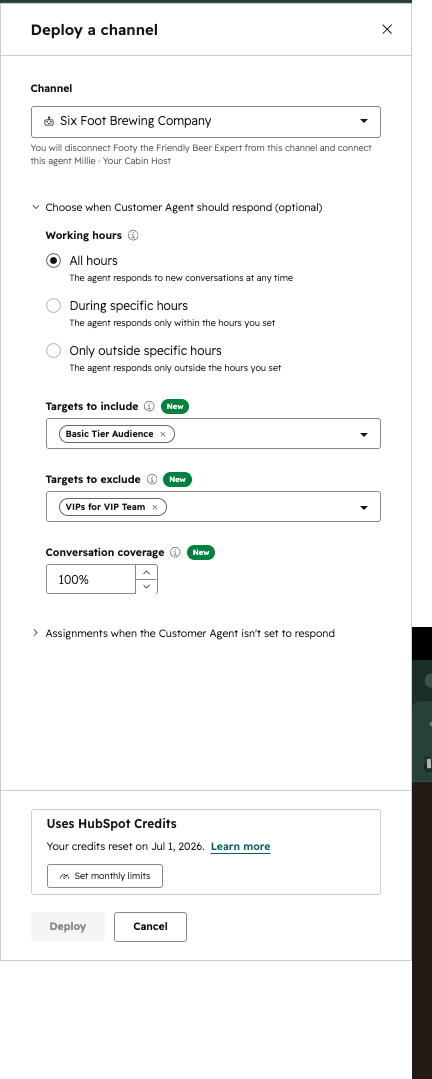
Admins define which contacts Customer Agent responds to on an email channel by selecting from existing HubSpot Lists.
Why does it matter?
Reason for development
Admins need a way to control which contacts receive automated responses from Customer Agent on email, ensuring only relevant users are served and preventing unintended automation to highly sensitive audiences. This enables more precise, familiar, and efficient workflows using existing segmentation tools.
Have Customer Agent handle your low risk audiences while the agent always hands off a high risk audience email
How does it work?
How it works
- - Navigate to the Customer Agent deployment settings for the email channel.
- - In the optional targeting step, select existing HubSpot active lists, static lists, or contact property filters to define the audience for CA responses.
- - Contacts in the "excluded" targeting criteria are routed to the human queue or receive no automated response from CA.
Technical details
- - Targeting is evaluated at ticket creation using the same segmentation infrastructure as live chat.
- - No new segmentation infrastructure is required; relies on HubSpot's current lists and filters.
Who gets it?
Marketing Hub Starter, Data Free, Sales Free, Sales Hub Professional, Smart CRM Professional, Sales Hub Enterprise, Data Hub Professional, Marketing Hub Professional, Data Hub Starter, Marketing Hub Enterprise, Content Hub Enterprise, Smart CRM Enterprise, Marketing Free, Data Hub Enterprise, Service Hub Starter, All hubs and tiers, Service Hub Professional, Service Hub Enterprise


.png?width=193&name=jos%20(1).png)




