What is it?
When setting up a custom event, you can now customize how that event appears on the activity timeline of linked object records, including the header, subheader, which properties are shown, and the order they appear in.
Why does it matter?
Custom events can track anything from video views to cart abandonment, but without context, a timeline card doesn't tell the full story. This gives you control over how each event surfaces on a record, so anyone reviewing that record's activity can immediately understand what happened and why it matters without needing to dig into raw event data.
- - Write headers and subheaders that describe the event in plain language using the actual values from that interaction
- - Choose which properties appear on the card and drag them into the order that's most valuable or logical for your team
- - Hide the properties list entirely when the header and subheader tell the story on their own
How does it work?
During custom event setup or editing, navigate to step 4. Customize timeline. You can also jump directly to this step by clicking it in the setup wizard's top navigation bar.
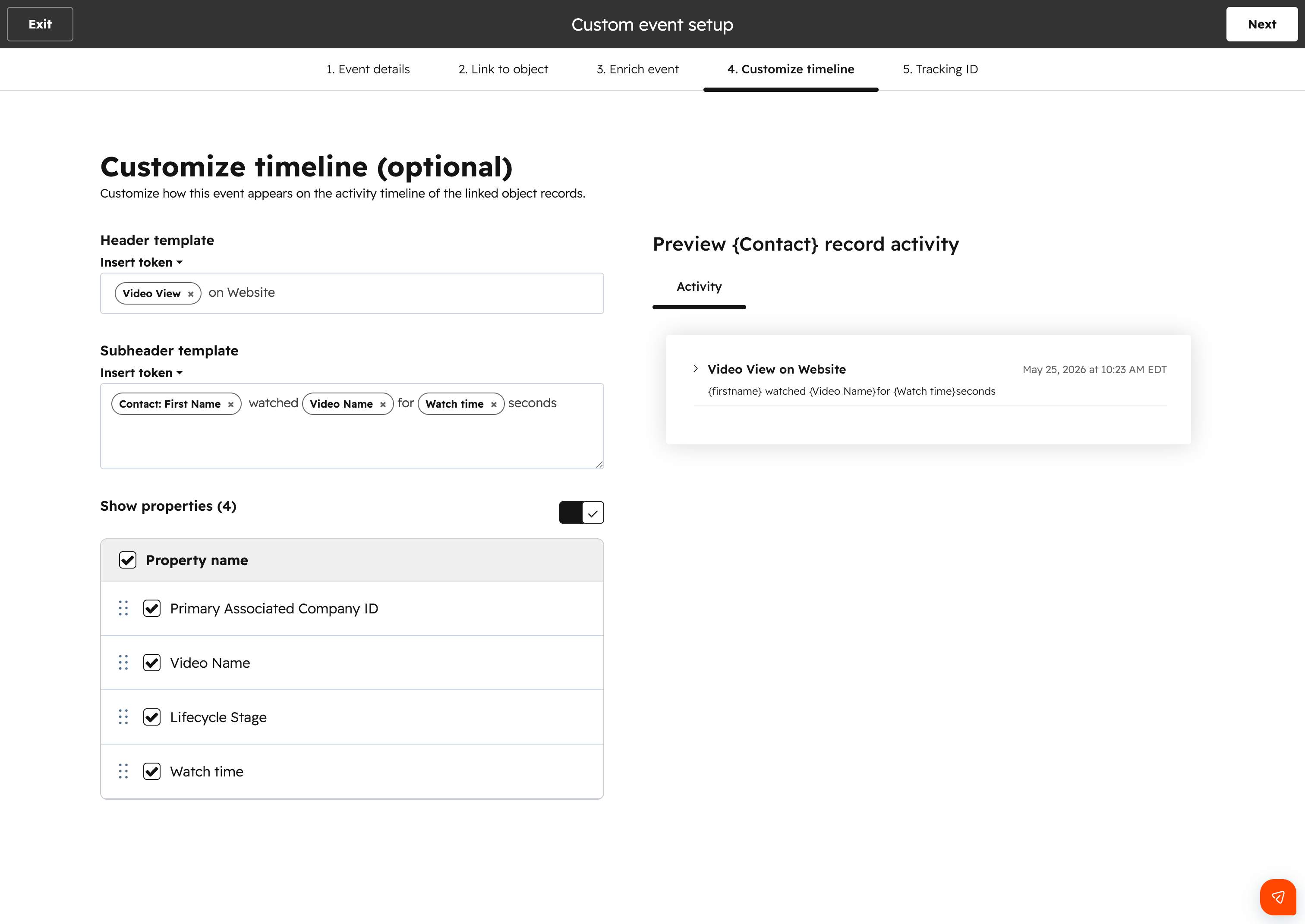
Header and subheader templates
Use the Insert token dropdown to build a header and subheader that pull in real values when the event fires. Available tokens include:
- - The linked record's name (e.g., contact name, company name)
- - Properties defined on this custom event
- - Any object properties added in step 3. Enrich event
The right-hand preview updates in real time as you edit.
Showing and ordering properties
By default, the Show properties toggle is on and all event properties are displayed on the expanded timeline card. From here you can:
- - Uncheck individual properties to hide them from the card
- - Drag and reorder properties using the handle on the left to control what gets seen first
- - Turn off the Show properties toggle entirely to show only the header and subheader on the card
Who gets it?
This feature is available to all users with custom event edit access on Marketing Hub Professional, Marketing Hub Enterprise, Sales Hub Professional, Sales Hub Enterprise, Service Hub Professional, Service Hub Enterprise, Content Hub Professional, Content Hub Enterprise, Data Hub Professional, and Data Hub Enterprise.



.png?width=193&name=jos%20(1).png)




