What is it?
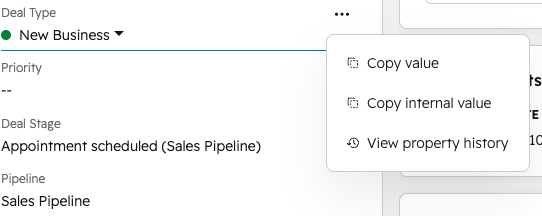
You can now access a quick-action menu on any property in your records. Hover over a property and click the "..." icon to copy the value, view property history, or take context-specific actions like calling a phone number, visiting a URL, or sending an email.
Why does it matter?
Common property actions that used to take several clicks are now one away. A few ways you might use it:
- - Sales reps can copy a deal's stage or owner value to paste into an email or internal doc without navigating away from the record.
- - Support agents can pull up property history mid-conversation to see when a contact's status last changed, right from the Helpdesk sidebar.
- - Ops teams can grab internal property values, like API names, directly from the record without navigating to property settings.
How does it work?
- Open any record and find a property in the preview, left sidebar, Helpdesk sidebar, or a property list card in the middle pane.
- Hover over the property and click the "..." icon that appears.
- Choose from the available actions, which vary by property type:
- Copy value and Copy internal value: available on most properties
- View property history: available on all properties
- Call phone number: phone number properties
- Visit website: URL properties
- Send email: email properties
Who gets it?
All hubs and tiers



.png?width=193&name=jos%20(1).png)




