What is it?
When you export a single property's definition, you now get more data: the existing property details, plus direct links to every form, workflow, or other asset using that property — along with metadata like whether a workflow is on or off — and property access information.
Why does it matter?
Cleaning up and auditing properties is challenging when you can't see exactly where they're used or who can access them, and not having full visibility into your data after export used to mean manual work.
With this update, you can:
- - Audit a property list directly in a workflow or form instead of doing it manually.
- - Quickly see which workflows are active and prioritize what needs to be updated first.
- - Share the export so anyone can review property usage without needing app access.
How does it work?
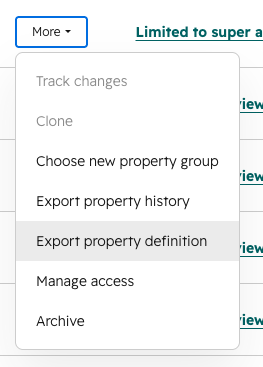
- In Settings, go to Properties and click the More menu for any property.
- Click Export property definition.
- Open the downloaded file. Sheet 1 has the property definition. Sheet 2 has a row for each usage, with a direct link to the asset in HubSpot and metadata like workflow status. Sheet 3 has property access information.
Who gets it?
All hubs and tiers



.png?width=193&name=jos%20(1).png)




