What is it?
Admins can now add section-level writing instructions to quote templates, so Breeze generates on-brand content every time.
Why does it matter?
Teams can build guidance directly into quote templates, so every rep starts with consistent, on-brand content while still tailoring each quote. This cuts editing time, keeps quotes clear and compliant, and helps customers get polished, easy-to-understand quotes faster.
How does it work?
- - Open a quote template and go to the content section tab for the section you want to guide.
- - Add short instructions — what to include, what to avoid, tone preferences.
- - Save the template. Breeze automatically applies those instructions every time someone generates a quote from it.
- - Generate the quote.
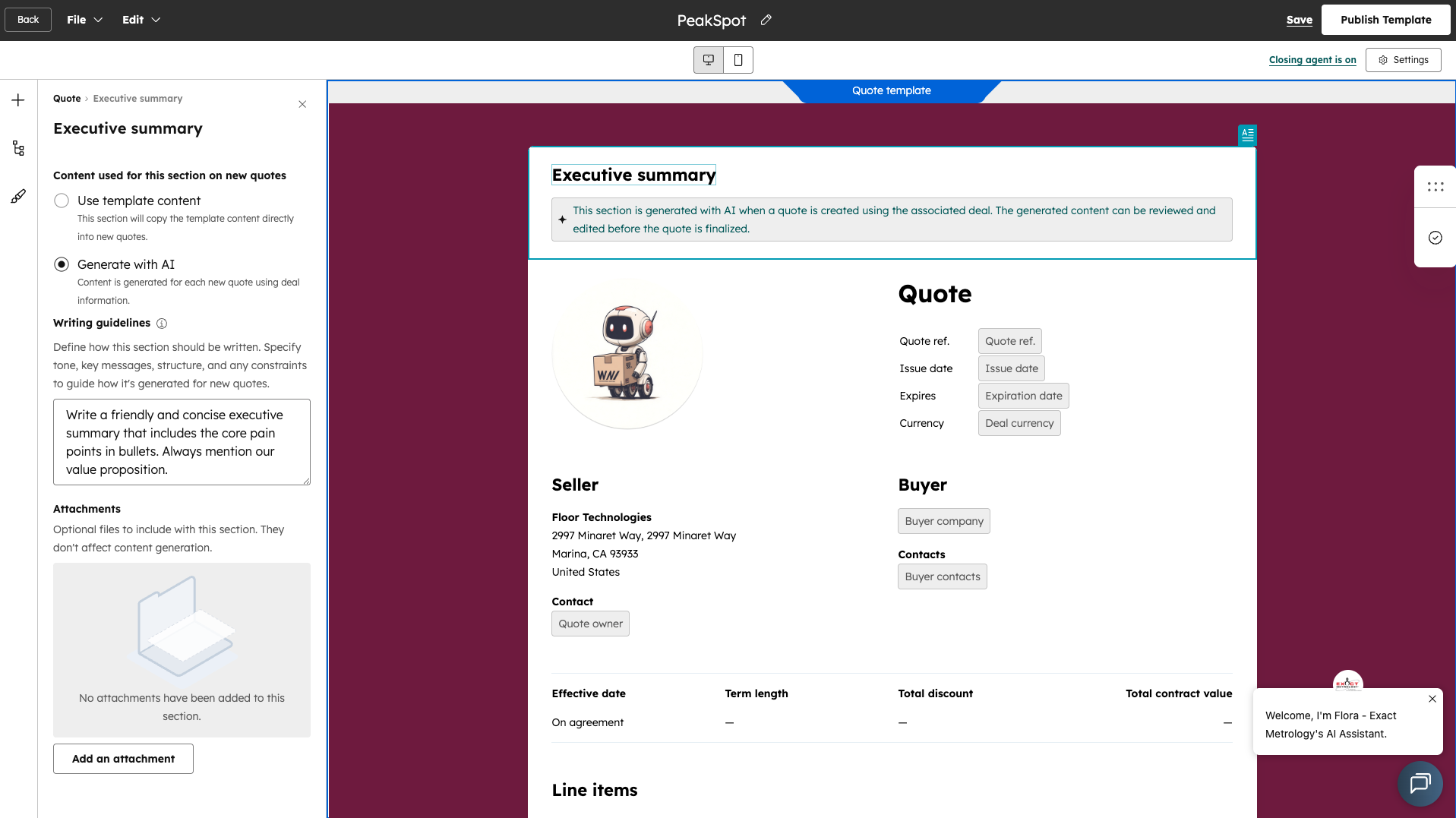
Note: Guidelines apply automatically to new quotes and to existing quotes when sections are regenerated after saving instructions. Reps can still refine or rewrite AI-generated content, but the built-in guidance keeps every quote aligned with your brand and standards.
Who gets it?
Commerce Hub Professional, Commerce Hub Enterprise


.png?width=193&name=jos%20(1).png)




