What is it?
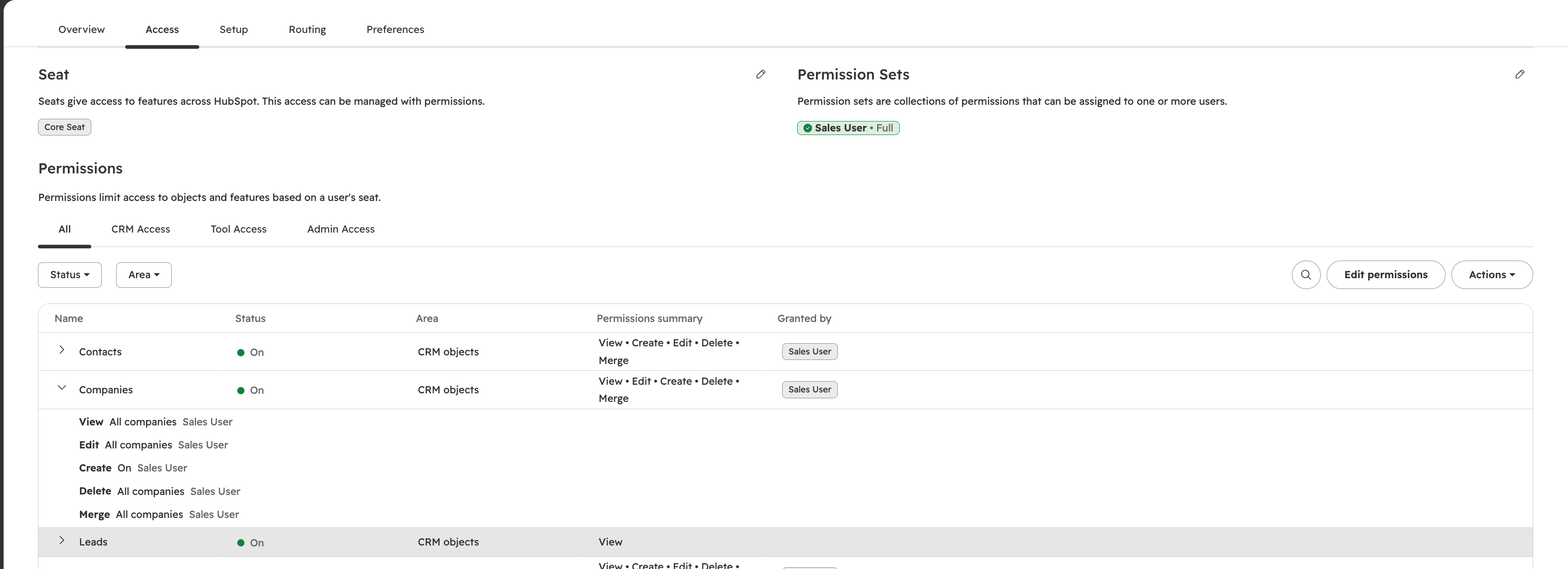
Previously, getting a clear picture of what a user could access meant extra steps. Admins had to open the permissions editor just to see what was already enabled. Now, that information is displayed directly on the User Record.
Why does it matter?
See what each user has access to without the extra steps, so it’s easier to understand at a glance.
How does it work?
Navigate to the User Record by selecting the user from the Users table. In the "Access" tab, you'll see a list of enabled permissions and what levels of access within. This list is also filterable by types of access.
Additionally, it will show how that access was granted, whether that be individually assigned permissions or a Custom Permission Set (Enterprise Only).
Who gets it?
All hubs and tiers