What is it?
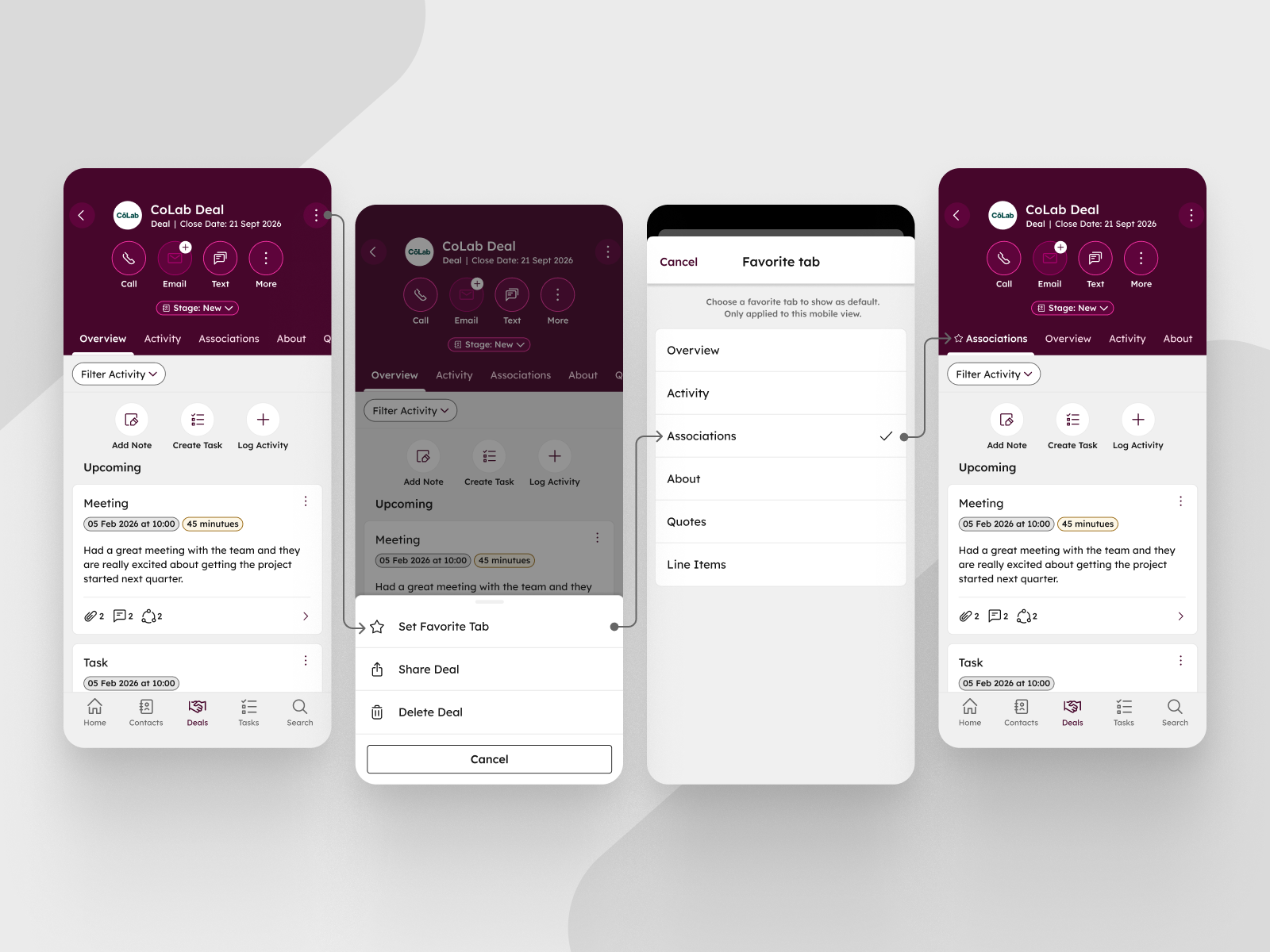
Mobile app users can now set a preferred default tab (About, Activity, or Overview) for each CRM record type, so their chosen tab displays first when opening records.
Why does it matter?
You can now customize which tab appears first when opening CRM records on mobile, reducing the number of taps needed to access the information most relevant to your workflow. Different roles prioritize different data. Sales reps might need quick access to activity history, while account managers focus on deal details. This personalization helps you work more efficiently in the field by eliminating the extra navigation steps to reach your most-used information.
How does it work?
To set your favorite tab:
- Open any CRM record in the mobile app
- Tap the three dot menu in the top right corner
- Select Set Favourite Tab
- Choose your preferred tab
Your selection applies to all records of that type and persists across app sessions. This setting only changes which tab appears first. The overall tab order remains the same, and you can still access all other tabs normally.
Who gets it?
The HubSpot mobile app update is available for Hubs and Tiers, on both iOS and Android platforms.



.png?width=193&name=jos%20(1).png)




