What is it?
A way to have Breeze Assistant run a prompt for you automatically on a recurring schedule — daily, weekly, monthly, or annually — and drop the answer in your chat list when it's done.
Why does it matter?
Breeze Assistant chats have historically been reactive, only running when you open it and ask something. Scheduled Prompts change that. A Monday-morning pipeline check, a daily call-prep brief, a weekly health summary for your accounts. Breeze can now run these automatically, so the answer is waiting in your chat list when you open HubSpot.
How does it work?
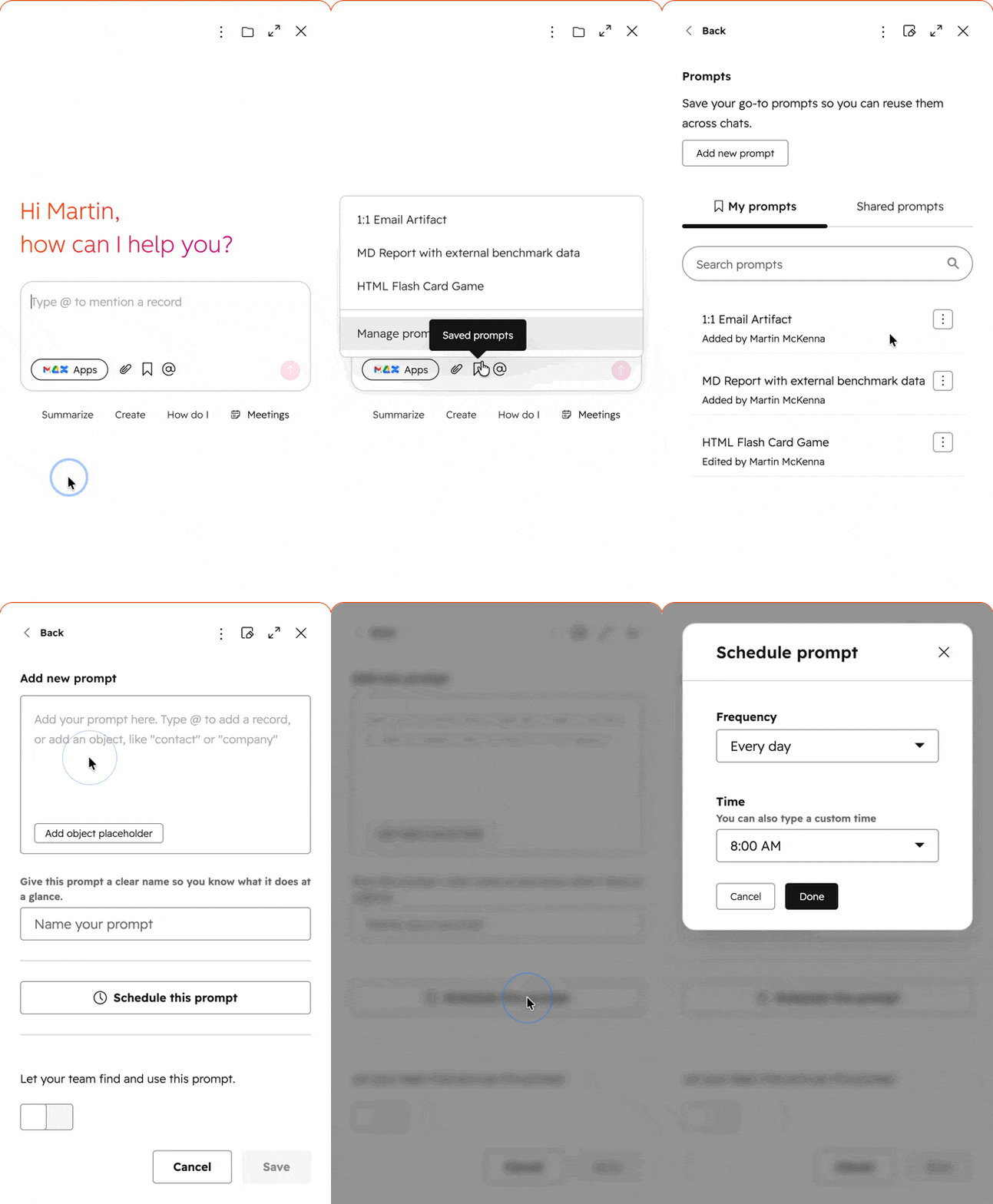
- - In Breeze Assistant, click the bookmark icon and click Manage Prompts. Add a new prompt, or edit a saved prompt, and click Schedule this prompt. Pick a frequency (every day, every week on a specific day, every month, or every year), set the time — or type a custom one — and hit Done.
- - You can also create one conversationally: "every Monday morning summarise my open deals."
- - Breeze runs the prompt in the background at the scheduled time. When it finishes, the result appears in your chat list as a conversation thread marked with a clock icon and an unread dot. On mobile, you get a push notification that takes you straight to the result. Open the thread, read the output, and continue the conversation if you want.
- - You can pause, resume, or delete any schedule from the prompt's three-dot menu, and convert between saved and scheduled prompts at any time, or just ask Breeze to do the same.
- - Limits: Each user can have up to 5 active scheduled prompts (paused prompts don't count toward this cap). Each portal can have up to 500 active prompts across all users. At run time, a rolling 24-hour window caps execution at 5 runs per user and 500 runs per portal — failed runs don't count against the daily limit. In practice, this means a user with 5 daily schedules will use their full daily run budget each day.
Who gets it?
All hubs and tiers


.png?width=193&name=jos%20(1).png)




