What is it?
Description
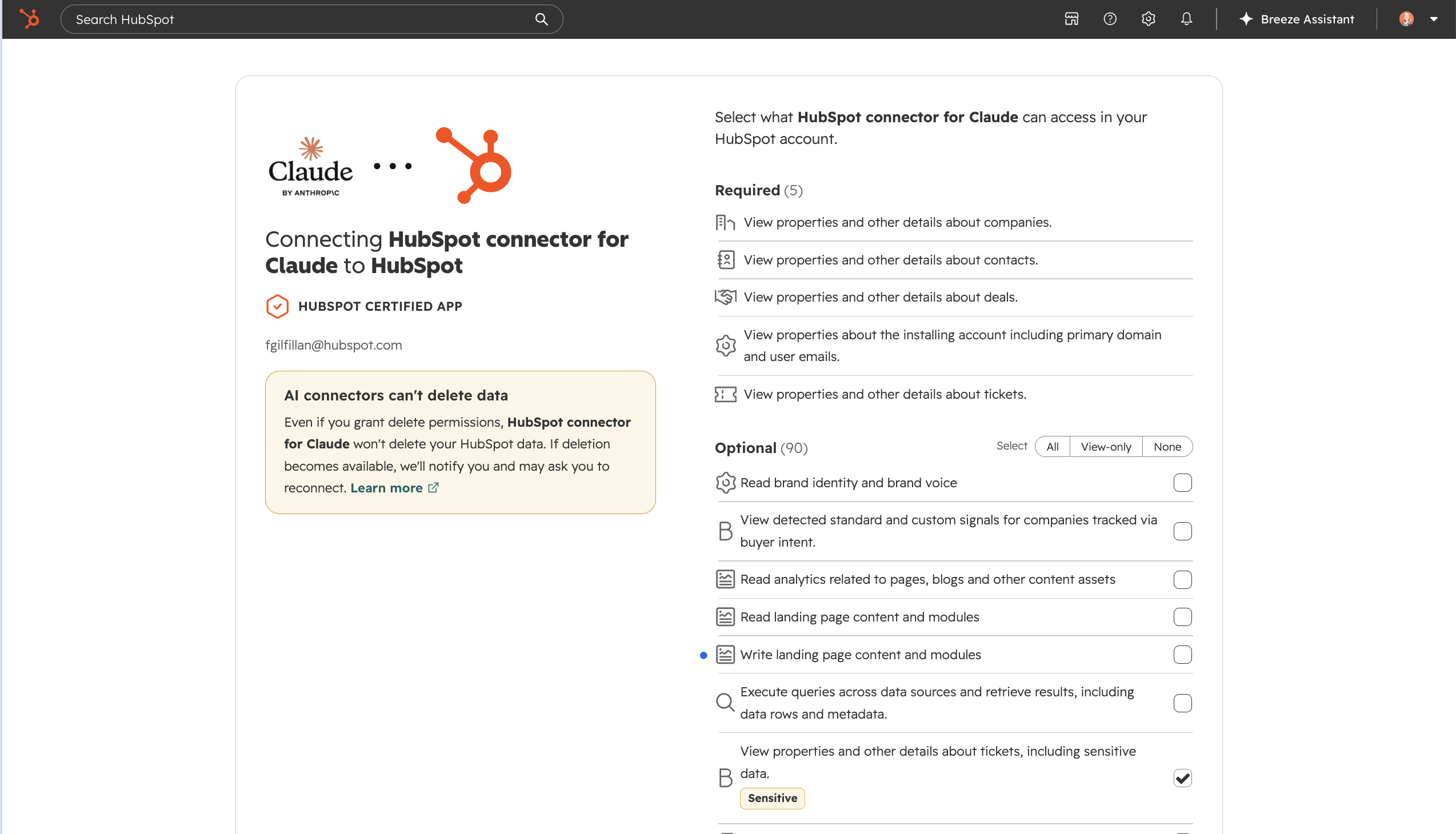
You can now allow supported third-party AI connectors to access sensitive CRM engagements and properties on accounts with sensitive data enabled. A super admin can opt in to let these integrations process sensitive data, provided the appropriate user permissions are in place.
Supported connectors include Claude, ChatGPT, Copilot, Gemini, and the Remote MCP server, with availability varying by data type as described below.
Why does it matter?
If your account stores sensitive data, AI connectors have had limited access to sensitive engagements and properties. This limited the AI-powered workflows, automations, and insights you could use across your CRM data.
This update gives you a clear, consent-based way to extend AI connector access to sensitive CRM data, helping you use AI more effectively while keeping account-level control over access.
How does it work?
- Make sure your account is eligible for the Sensitive Data AI connector rollout.
- If the connector was installed before these permissions became available, disconnect it before reconnecting:
- Open your AI provider's connector or integration settings. Menu names vary by provider.
- Find the HubSpot connector and select Disconnect, Remove, or the equivalent option.
- In HubSpot, go to Settings > Integrations > Connected Apps and disconnect the corresponding AI connector.
- Reconnect the HubSpot connector from your AI provider and complete the HubSpot authorization flow.
- During authorization, select the optional permissions for sensitive engagements and, where available, sensitive CRM properties.
- Users must have the required Sensitive Data read or field-level permissions to grant and use these scopes.
- Access is read-only in this phase. To revoke access, disconnect the connector or remove its optional sensitive-data permissions through Connected Apps.
If the optional permissions do not appear, confirm that the account is included in the rollout and that the installing user has the required HubSpot permissions. New permissions can take up to two hours to appear after reauthorization.
Connector availability
- Claude, ChatGPT, and Copilot: Support access to sensitive engagements and sensitive properties.
- Gemini: Supports sensitive-data engagements today; support for sensitive properties is coming soon.
- Remote MCP server: Supports sensitive-data engagements.
Supported sensitivity levels
- Sensitive: Supported
- Highly Sensitive: Not supported by design. Highly sensitive data is intentionally excluded from third-party AI connector access.
- HIPAA: Supported
Who gets it?
Commerce Hub Enterprise, Content Hub Enterprise, Marketing Hub Enterprise, Data Hub Enterprise, Sales Hub Enterprise, Service Hub Enterprise, Smart CRM Enterprise



.png?width=193&name=jos%20(1).png)




