What is it?
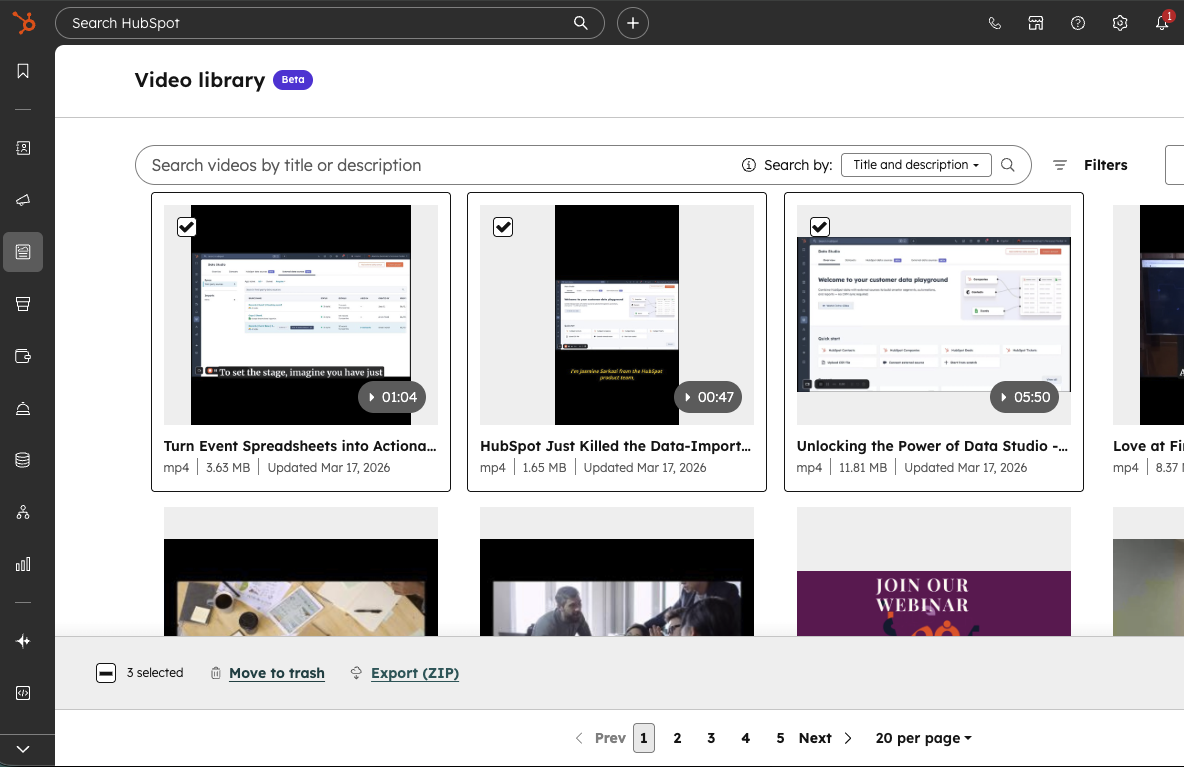
Bulk actions in the HubSpot video library let you select multiple videos at once using checkboxes, then take action on them together. You can now export and download several videos in one step or move multiple videos to trash at the same time.
Why does it matter?
If you manage a growing library of video content, handling videos one by one can slow down routine cleanup and asset management. Bulk actions make it easier to organize your library, remove outdated content, and export groups of videos without repeating the same steps for each file.
For content marketers creating and editing video, this means less time spent on manual library maintenance and more time focused on publishing, updating, and reusing content across campaigns.
How does it work?
- In HubSpot, go to the Video library (Content -> Video)
- Hover over the videos you want to manage and select the checkbox on each video.
- After selecting multiple videos, use the bulk action bar at the bottom of the page.
- Click Export (ZIP) to download the selected videos together.
- Click Move to trash to remove the selected videos from your library.
- Review your selection count in the action bar to confirm you’re taking action on the right set of videos.
Who gets it?
Content Hub Professional, Content Hub Enterprise, Marketing Hub Professional, Marketing Hub Enterprise, Service Hub Professional, Service Hub Enterprise


.png?width=193&name=jos%20(1).png)




