What is it?
AEO Site Audit is a new feature inside HubSpot's Answer Engine Optimization tool that analyzes your website and surfaces the content and technical issues most likely to reduce your brand's visibility in AI answer engines like ChatGPT, Gemini, and Perplexity.
The audit runs across two dimensions: content quality (how well your pages follow AEO best practices) and technical health (whether your site structure and metadata are set up in ways that support AI discoverability). Results are organized into a prioritized list of recommendations your team can act on directly.
Why does it matter?
As buyers shift toward AI-generated answers rather than traditional search results, brands that aren't optimized for these engines risk being invisible at the exact moment a potential customer is asking a relevant question. Most teams have no way to diagnose why their brand is underperforming in AI answers or where to start fixing it.
AEO Site Audit addresses three common pain points:
- - No visibility into content gaps: Teams do not know which pages are missing the depth, structure, or coverage that AI engines look for when selecting citations.
- - Technical issues go undetected: Problems like missing structured data, poor canonicalization, or slow page load times quietly suppress AI discoverability without triggering any obvious alert.
- - Recommendations lack prioritization: Even when issues are identified manually, there is no clear signal about what to fix first given the potential impact on AI visibility.
How does it work?
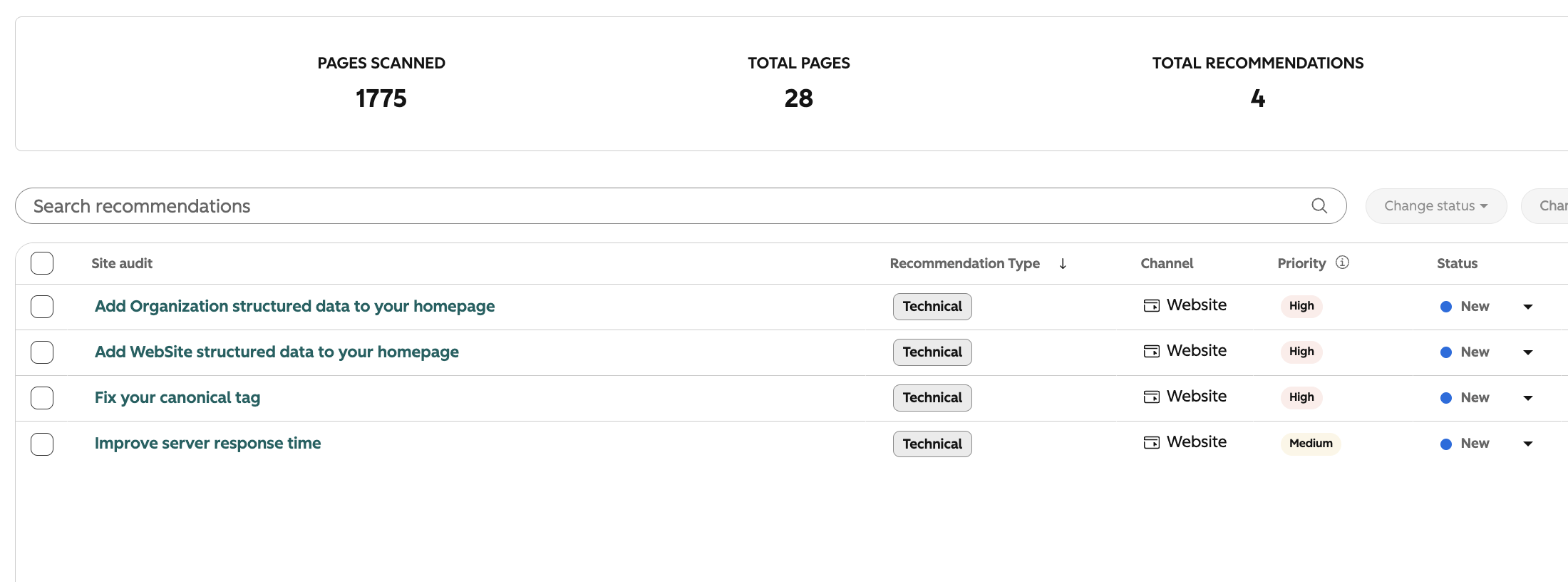
The audit is divided into two cards on the Recommendations tab in your AEO dashboard:
- Content Audit
- Scans your pages against the topics and prompts tracked in your AEO portal
- Flags pages that don't follow popular AEO best practices, such as missing titles and weak meta descriptions.
- Surfaces a prioritized list of content improvement recommendations, each mapped to specific pages
- Technical Audit
- Crawls your site for structural and metadata issues that affect how AI engines read and trust your content
- Checks for structured data markup, canonical tags, page speed signals, and crawlability
- Returns a scored list of technical fixes ranked by estimated impact on AI discoverability
To run an audit, navigate to your AEO portal and open the Recommendations tab. Go to Site audit and run the audit. Results appear within the portal alongside your existing recommendations.
Who gets it?
This feature is available for Marketing Hub Professional and Marketing Hub Enterprise, as well as HubSpot AEO subscribers.


.png?width=193&name=jos%20(1).png)




