What is it?
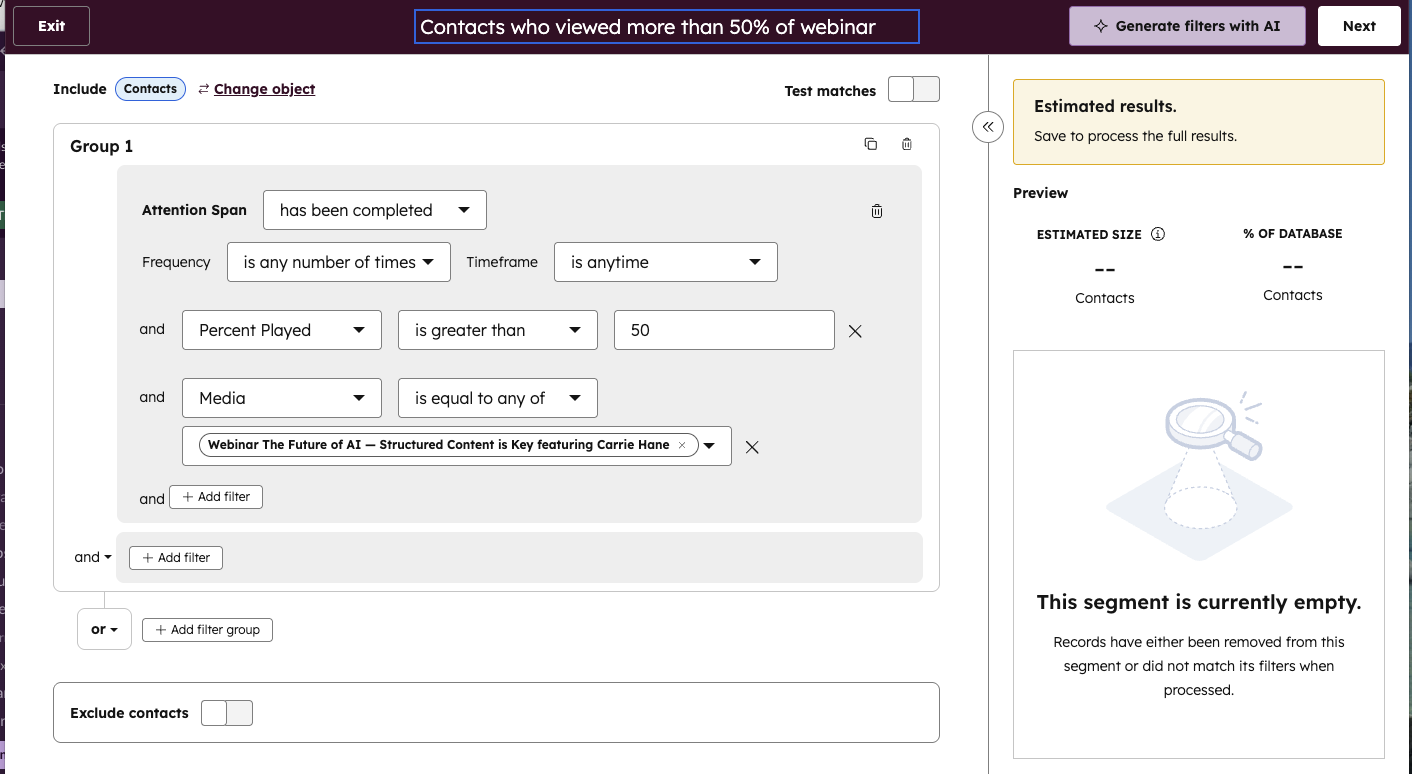
You can now build segments based on how much of a video a contact has watched. The new filter allows you to segment contacts using the highest percentage of a video they’ve viewed, even across multiple plays.
Why does it matter?
Segmenting your audience by engagement level helps you deliver more relevant messaging. This feature gives you more control over targeting by using real video consumption data, not just generic view events.
For example, you can now create a list of contacts who watched more than 75% of a product demo video—perfect for identifying highly interested leads or ready-to-buy prospects.
How does it work?
- Go to CRM > Segments (formerly Lists) in the global navigation and create a new segment of contacts.
- Add a filter under "events" and select "media interactions" and “Attention span”.
- Add a filter under "Attention span" for "Percent played".
- Add your threshold: example: Percent played is greater than 50%
- The list will update dynamically as contacts meet the criteria.
Notes:
- Only contact segments are supported
- The system uses the maximum percentage watched per contact, even if they watched the video more than once.
Who gets it?
Professional Customer Platform, Enterprise Customer Platform, Content Hub Professional, Content Hub Enterprise, Marketing Hub Professional, Marketing Hub Enterprise, Service Hub Professional, Service Hub Enterprise





.png?width=193&name=jos%20(1).png)




