What is it?
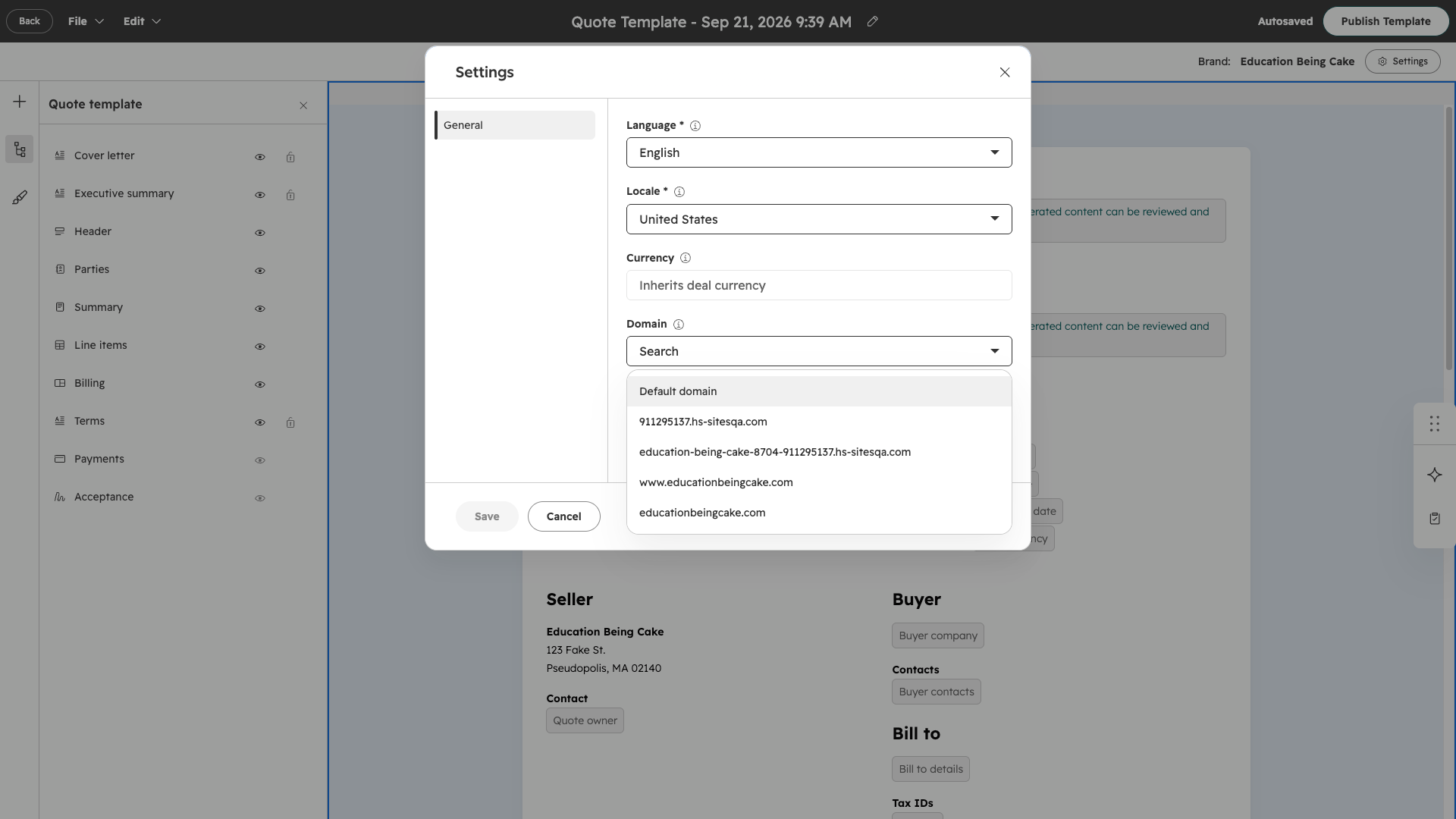
As an admin, you can now choose which connected domain each quote template uses when you publish quotes. Any quote created from a template automatically uses that template's domain.
Why does it matter?
If you manage more than one brand, you no longer have to publish every quote to the same default Quotes domain. You can assign a different domain to each template, so quotes publish on the domain that matches the brand they're sent from. Your customers get a consistent, on-brand experience.
How does it work?
Set a domain on a quote template
- Go to Quotes > Settings > Templates.
- Open the quote template you want to update.
- Choose the connected domain you want the template to use.
What to know
- - The domain list comes from the domains you've already connected in Domain Manager.
- - If a template is associated with a brand, it uses a domain associated with that brand by default.
- - Once you set a domain, every quote created from that template uses it automatically.
- - Reps can see which domain a quote will use while they create it, but they can't change it.
Who gets it?
This feature is available for HubSpot Revenue Hub Professional and Revenue Hub Enterprise. You need admin permissions to set a domain on a template, and the domain must already be connected in Domain Manager.



.png?width=193&name=jos%20(1).png)




