What is it?
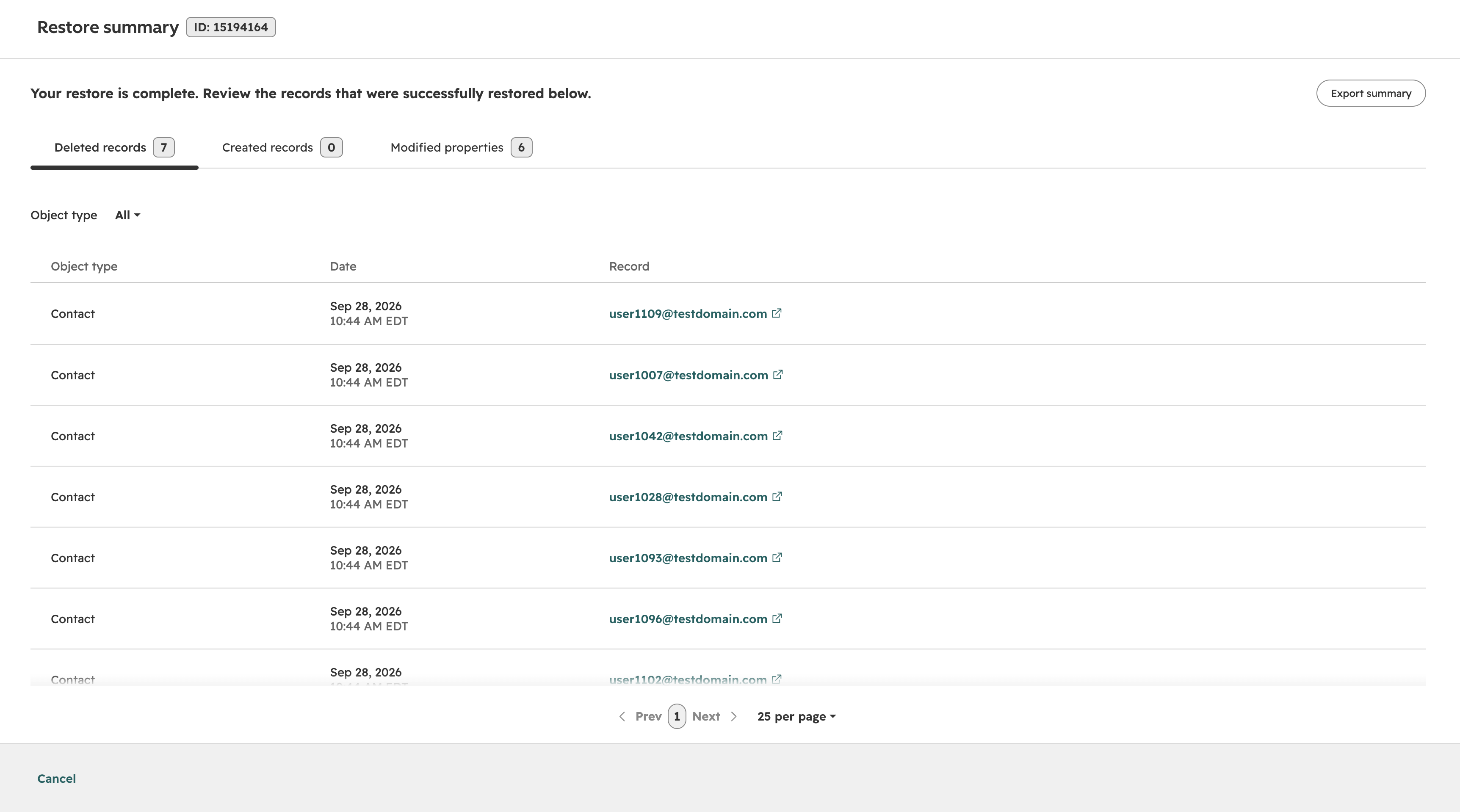
Admins can now view a detailed summary of what was restored, including user, scope, source, and timestamp, after completing a restore.
Why does it matter?
Admins need to confirm whether a restore worked without manually spot-checking records; this reduces uncertainty, builds trust, and minimizes support contacts by clearly displaying what changed during a restore.
How does it work?
After a restore completes, a success banner provides a link to the restore summary page or panel. The summary displays the restore actor, scope of changes, source attribution, and timestamp. This information is also recorded as a restore event in the audit log for later reference by other admins.
This functionality is applied automatically and does not require any customer action or control.
Who gets it?
Smart CRM Enterprise, Revenue Hub Enterprise, Marketing Hub Enterprise, Data Hub Enterprise, Content Hub Enterprise, Sales Hub Enterprise, Service Hub Enterprise


.png?width=193&name=jos%20(1).png)




