What is it?
You can now use association labels to choose object associations to sync between HubSpot and Salesforce for Custom Objects, Tickets, Activities and Company objects.
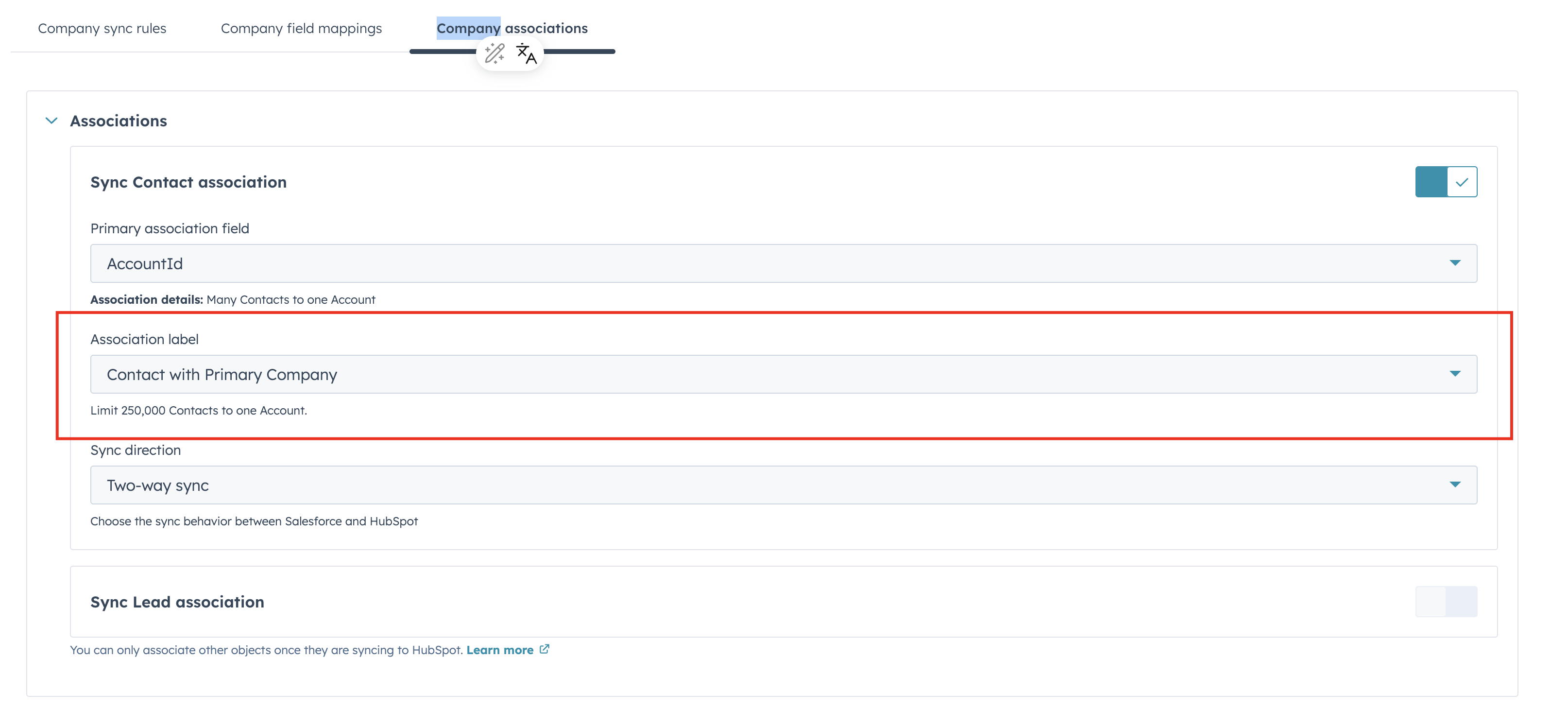
Additionally, object associations settings have moved to a new tab underneath the relevant object.
Why does it matter?
Association labels add meaning to the relationships between your records. For example, labeling a contact object as a "Primary," "Decision Maker," or "Billing Contact" on a company record.
Before this update, you couldn't choose which of those labeled associations synced with Salesforce. Now you can keep your records accurate and consistent across both platforms, with the ease of a dropdown menu showing all association labels available for the given object.
How does it work?
On the settings page for the relevant object, customers will now see an Associations tab. There, they will find settings for Associations, including a new Association Label dropdown menu.
Who gets it?
Content Hub Professional, Content Hub Enterprise, Marketing Hub Professional, Marketing Hub Enterprise, Sales Hub Professional, Sales Hub Enterprise, Service Hub Professional, Service Hub Enterprise, Smart CRM Professional, Smart CRM Enterprise



.png?width=193&name=jos%20(1).png)




