What is it?
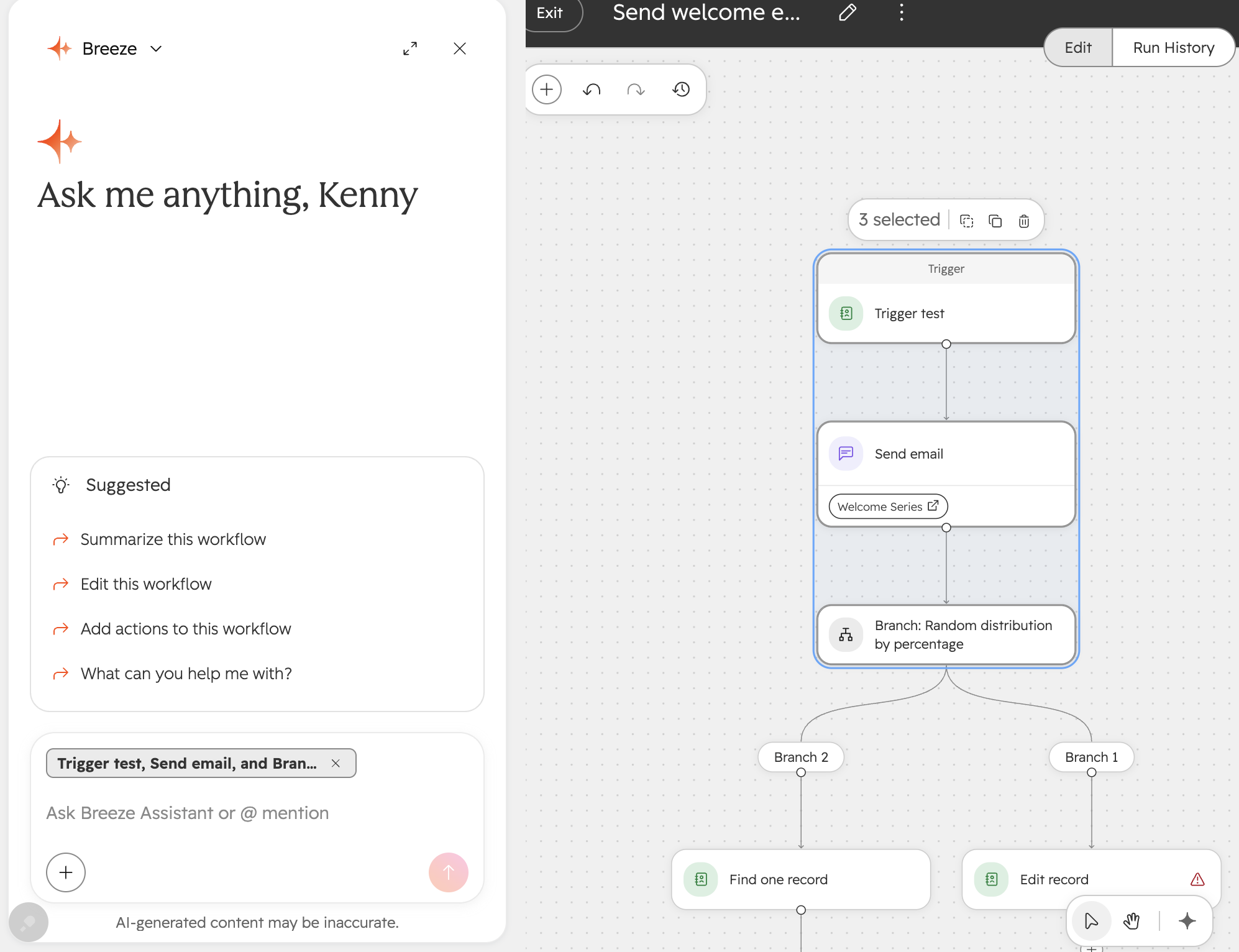
The canvas is the missing context. Select the trigger and actions — and that becomes the input to Breeze. You stop describing your workflow and start working on it together.
Why does it matter?
Today, Breeze is reacting to what you typed, not what you're actually working on, so it guesses — and builders spend more time correcting than building. Breeze becomes a real collaborator when it can see what you're building and works alongside you.
How does it work?
Users can select parts of their workflow and Breeze will automatically understand the specified context.
Who gets it?
Sales Hub Professional, Data Hub Professional, Marketing Hub Professional, Content Hub Professional, Smart CRM Professional, Service Hub Enterprise, Service Hub Professional, Revenue Hub Professional, Smart CRM Enterprise, Revenue Hub Enterprise, Marketing Hub Enterprise, Data Hub Enterprise, Content Hub Enterprise, Sales Hub Enterprise



.png?width=193&name=jos%20(1).png)




