What is it?
You can now customize when contacts are automatically unenrolled from sequences by turning off the default reply and meeting triggers.
Why does it matter?
Previously, sequences automatically ended when contacts replied to any email or booked a meeting - even if you wanted the outreach to continue. This interrupted communication flows beyond initial prospecting, forcing reps to manually re-enroll contacts or use workarounds. Now, you have the flexibility to continue sequences even after a contact responds.
How does it work?
For new and existing sequences:
- In the sequence builder, navigate to the Automate tab
- Toggle off unenrollment triggers as needed:
- "When a contact replies to any email"
- "When a contact books a meeting"
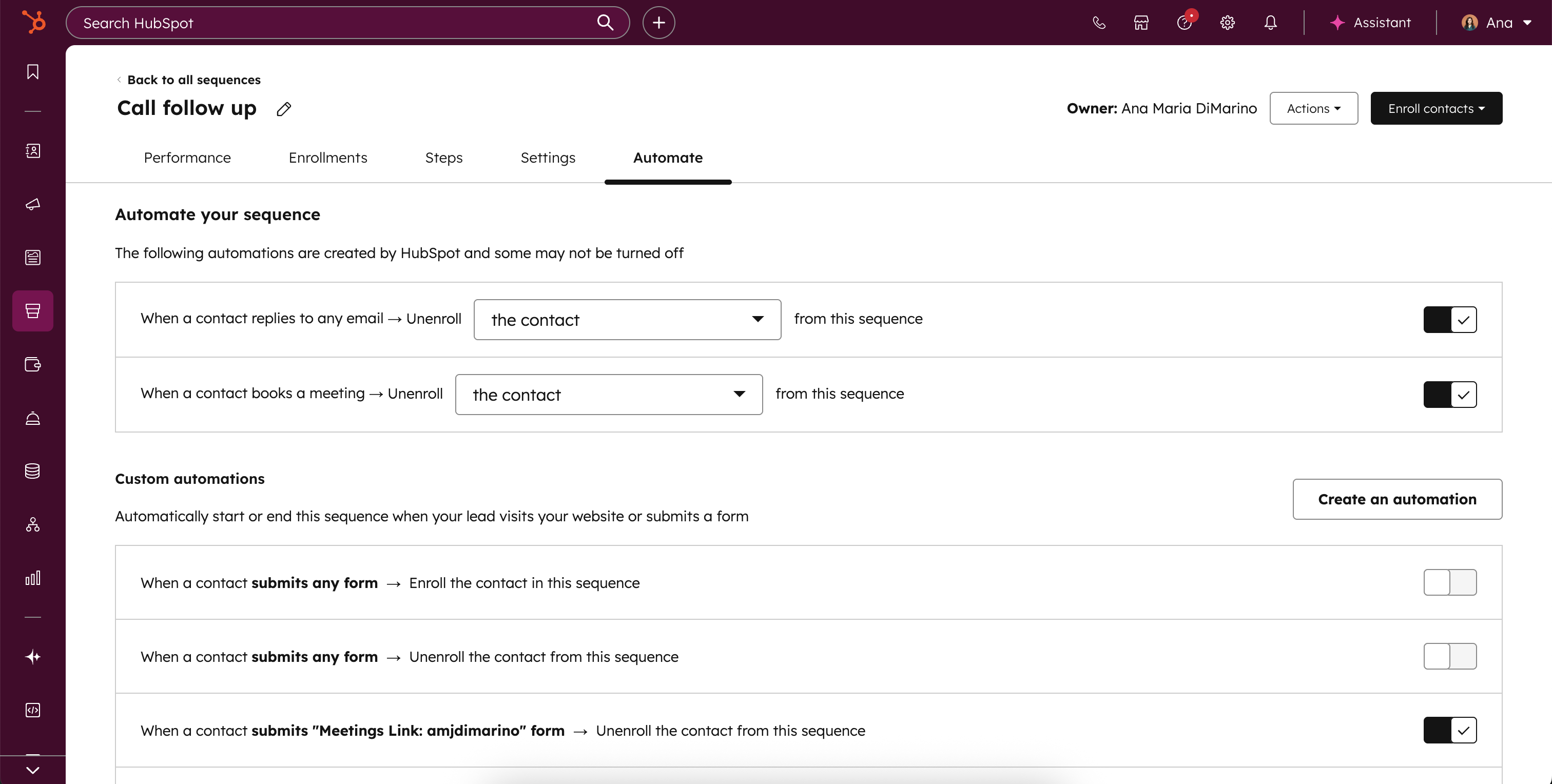
- Customize company-wide unenrollment–now you can separately control whether replies or meetings unenroll all contacts at that company

Note: These settings remain ON by default to preserve existing prospecting workflows. The enrollments table will also show engagement badges (replies/meetings) regardless of your unenrollment settings, giving you full visibility into contact engagement.
Who gets it?
Sequences are available on Professional Customer Platform, Enterprise Customer Platform, Sales Pro, Sales Enterprise, Service Pro, Service Enterprise


.png?width=193&name=jos%20(1).png)




