What is it?
Description
Users can connect Google Drive folders as Knowledge Vault sources in Breeze Studio for custom agents, making Drive content accessible and searchable for AI Agents while enforcing Drive permissions.
Why does it matter?
Reason for development
Many customers store critical institutional knowledge in Google Drive, but cannot easily leverage it within custom agent AI workflows.
This integration lets users access, search, and use their existing Drive documentation securely, with permissions and governance intact, eliminating the need to duplicate data or manage separate content sources.
How does it work?
Connecting Google Drive Folders
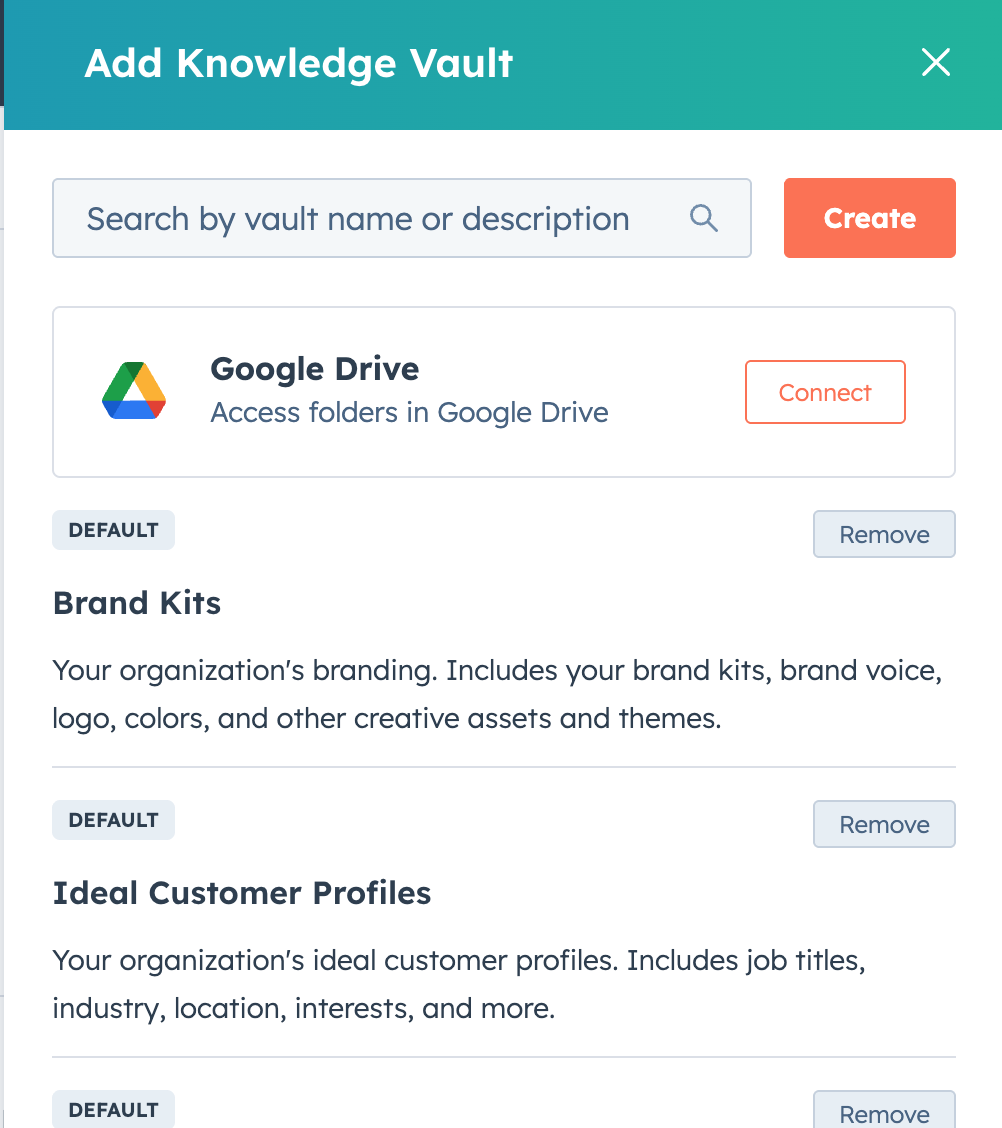
- Navigate to build custom agents in Breeze Studio, and select 'Add Knowledge' to have the option to connect a new content source.
- Authenticate with your Google account and select one or more Drive folders to connect.
- Custom Agent Vaults display a visible badge summarizing the Drive access mode and scope.
Permission Transparency & Auditability
Review which Google identity is connected, the list of connected folders, and the current permission scope via Vault details. All actions (search, file access, reauth) are logged and auditable by Vault admins/owners.
Handling Permission Changes
If Drive access is revoked or expires, users receive prompts to reconnect or reauthorize, and Vaults prevent further access until fixed. Agent responses and search results always reflect the permissions of the connected identity, ensuring context accuracy.
Who gets it?
All hubs and tiers



.png?width=193&name=jos%20(1).png)




