What is it?
A unified table and graph view for managing your entire data model — objects, properties, associations, and conditional logic — from one, easy to use place.
Why does it matter?
Managing your data model used to mean jumping between multiple settings pages with no consistent picture of how objects, properties, and associations connect. By centralizing your data model in one spot, you get a single place to see and manage your entire Smart CRM structure, whether you're auditing a complex configuration or making a quick edit to a property group.
How does it work?
Navigate to Data Management > Data Model and select the Manage tab.
You'll land in the table view by default. Use the icons at the top of the visualization to switch between the table view and the graph view.
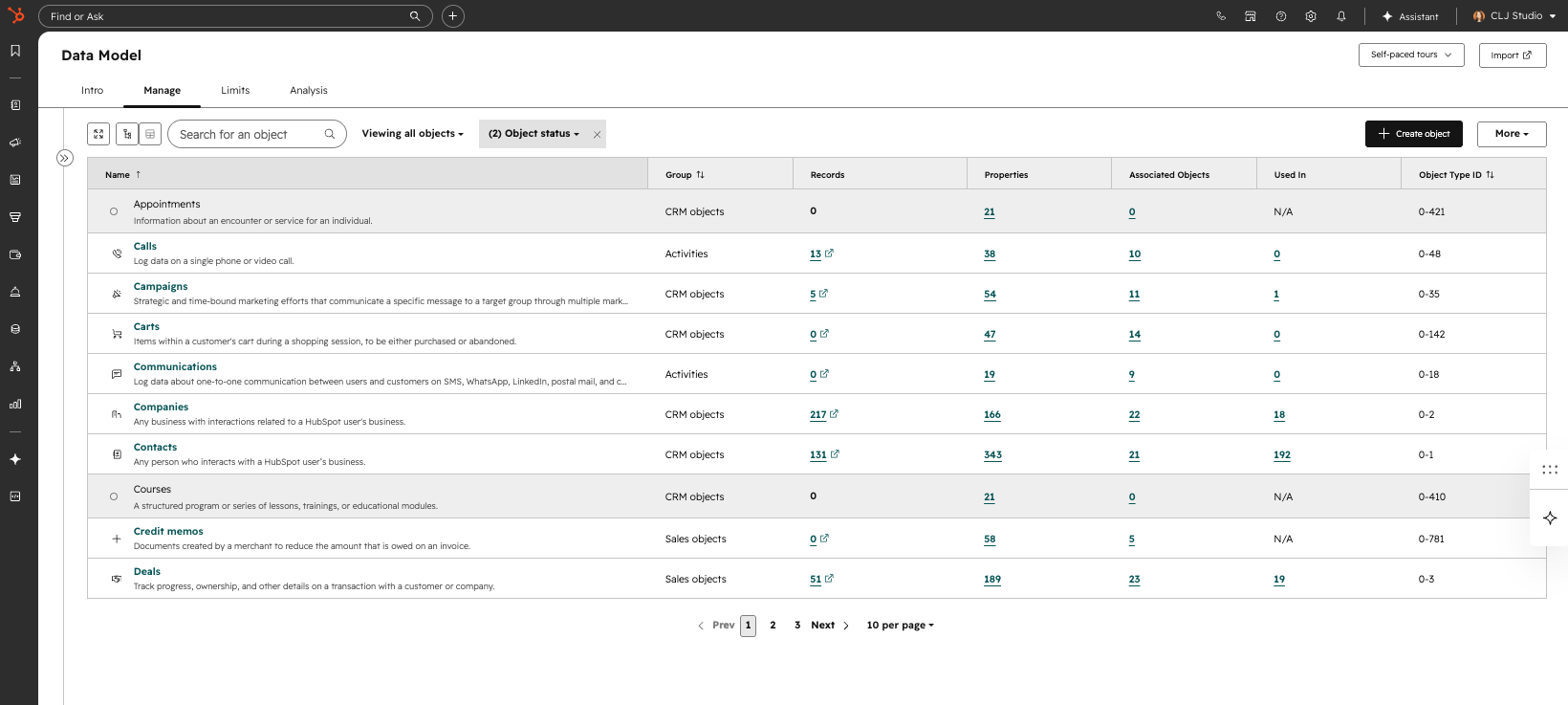
Additional capabilities introduced in this update:
Object Detail Panel
- - Select any object to open a detail panel with tabs for managing:
- - Properties and property groups
- - Associations
- - Conditional logic
An editor side panel is also available for browsing or selecting objects.
Object Management
From the data model overview, you can:
- - Create, edit, rename, and delete custom objects
- - Activate and deactivate objects
Export
- - Export properties to CSV or Excel
- - Export data model graph as image
Permission updates
- - Partner admins will now have all the capabilities as a super admins
- - A view-only permission option is now available for non-admin users
Who gets it?
All hubs and tiers





.png?width=193&name=jos%20(1).png)




