What is it?
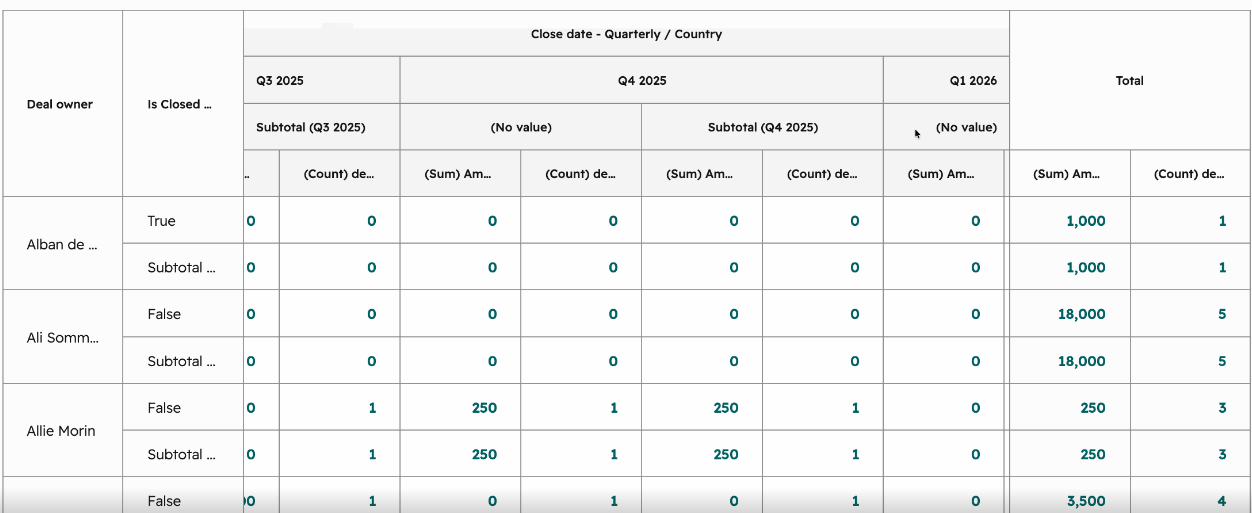
Pivot tables will now default to having columns frozen. This includes both the columns on the left hand side of the pivot table and the Totals columns on the right hand side of the pivot table. This means that scrolling horizontally on the pivot table will always freeze and keep these columns in view.
Why does it matter?
Pivot tables can have a lot of columns and as you scroll horizontally, you can lose reference of the values that you see, not knowing which value on the pivot tables is tied to which column. This creates hard readability issues for pivot tables. With the columns frozen now, scrolling horizontally through the pivot tables should still allow for better readability and understanding of pivot tables.
How does it work?
By default pivot table columns on the left hand side and the Totals columns on the right hand side will be frozen now. No setting change required.
Who gets it?
All hubs and tiers





.png?width=193&name=jos%20(1).png)




