What is it?
|
We’ve added contextual help text to date filters that clearly explains which records are included based on your selection. When you use date operators like “is,” “is before,” “is after,” or “today,” you’ll now see a short explanation under the filter that describes the exact range being applied. For example: "Includes properties on or before Nov 7, 2025 (EST)."
This makes it easy to understand how dates, boundaries, and time zones are interpreted. |
Why does it matter?
Customers said that date filters often felt unpredictable—especially when using ranges like before or after. It wasn’t always clear:
- - Whether the selected date was included or excluded
- - How “today” was calculated
- - Which time zone is the filter used for?
This ambiguity caused confusion and mistrust in the results. With these inline explanations, you gain full transparency into the date logic, enabling you to build segments, lists, and workflows confidently.
How does it work?
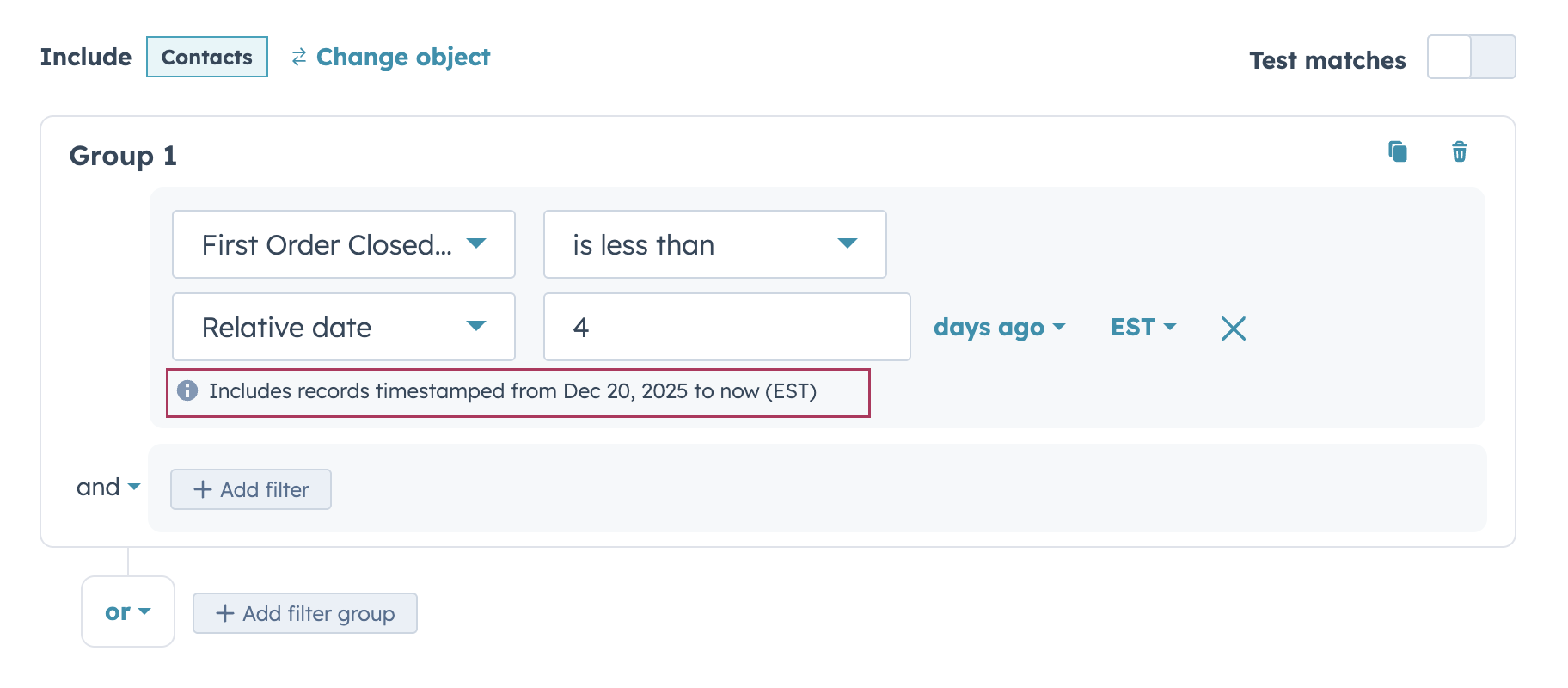
- - Add a date or date-time property to your filter
- - Choose an operator (for example, is, is before, or is after)
- - Select a date - dynamic option like Today or a rolling date like x-days ago
- - HubSpot will automatically display contextual help text under the filter explaining:
-
-
- - The exact date range included
-
- - Whether the selected date is inclusive
- - The time zone used for evaluation
-
The explanation updates dynamically as you change the operator or date.
Who gets it?
All hubs and tiers





.png?width=193&name=jos%20(1).png)




