What’s changed?
Now supports creating metrics from custom properties, building metrics using formulas, and managing all metrics centrally with new admin tools for viewing, editing, and deleting from a single screen.
What is it?
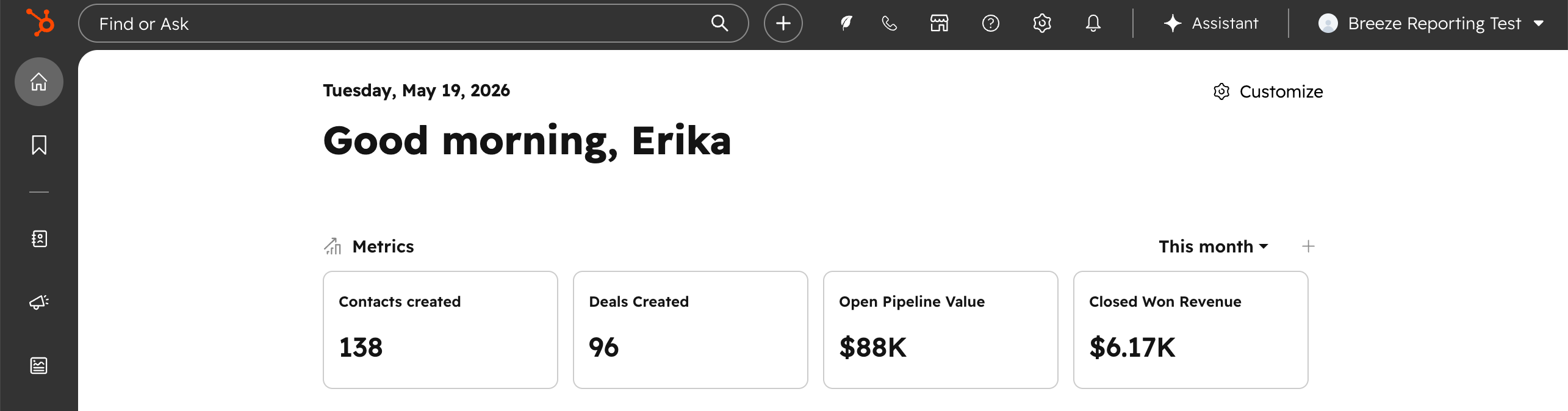
A new widget on Global Home that shows your key business metrics as soon as you log in. Each metric displays a KPI number with a comparison to the previous period, based on your Smart CRM data.
Why does it matter?
Checking how your business is doing shouldn't require building a report. Metrics on Global Home give you a quick pulse on the numbers that matter — new contacts, open deals, closed revenue — right where you start your day in HubSpot.
How does it work?
When you open Global Home, you'll see a row of metric cards based on your CRM data. Each card shows a metric name, its current value, and how it compares to the previous period.
To customize what you see:
- - Add a metric by choosing from predefined options or creating one from scratch.
- - Edit a metric by clicking it and changing the definition or swapping it for a predefined metric.
- - Remove a metric you don't need, or add it to a dashboard for deeper analysis.
You can also reorder the widget on Global Home using the "Configure" menu.
Who gets it?
All hubs and tiers





.png?width=193&name=jos%20(1).png)




