What’s changed?
What is it?
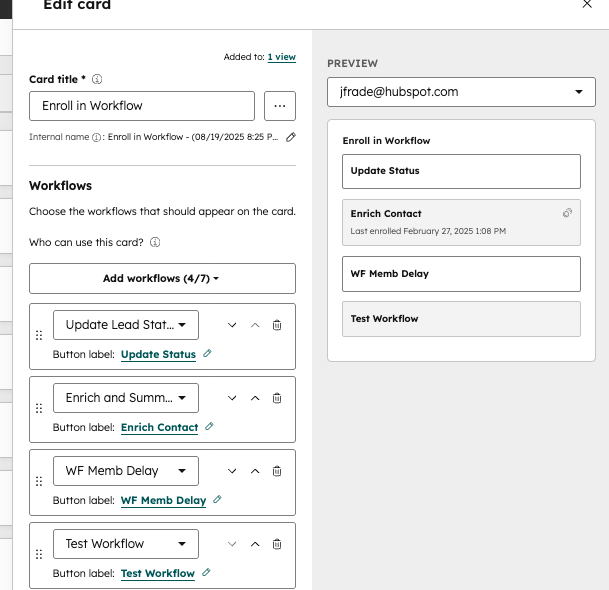
You can now customize the workflow names that display on the Enroll in Workflow CRM card.
This lets you display clearer, more user-friendly names without changing the workflow’s original name in your automation setup.
Why does it matter?
Workflow names are often long or built for admins, which can make them confusing for CRM users who just want to understand what’s happening in a workflow before they enroll a record in it.
By letting you edit how a workflow is labeled on the CRM card, users get quick, intuitive context, without requiring changes to your existing workflow naming conventions.
How does it work?
From the Enroll in Workflow CRM card, you can edit the displayed name to something more meaningful for your team. The updated name appears only on the CRM card (name will not be reflected in the Workflows app), making it easier for reps to understand the workflow’s purpose at a glance.
Who gets it?
Marketing Hub Professional, Marketing Hub Enterprise, Data Hub Professional, Data Hub Enterprise, Sales Hub Professional, Sales Hub Enterprise, Service Hub Professional, Service Hub Enterprise, Smart CRM Professional, Smart CRM Enterprise





.png?width=193&name=jos%20(1).png)




