What’s changed?
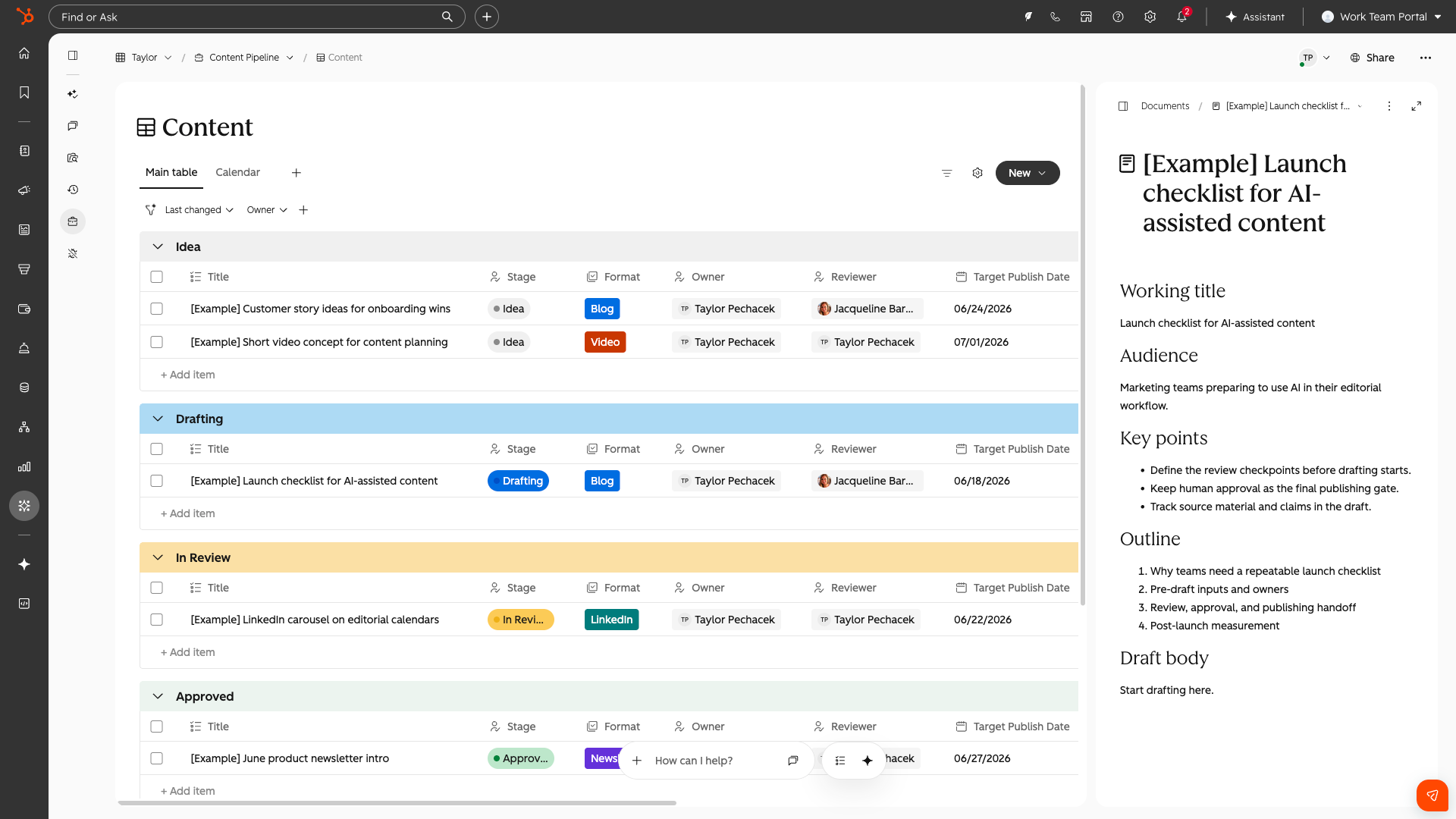
Where to find it?
Once enrolled, it may take a few minutes to see the product. You can access this along your left hand navigation titled "Work Management". This may appear under "More". You can pin it for quick access in the future.
To navigate directly there the URL is: app.hubspot.com/work/{portalId}
What is it?
HubSpot Work (Beta) is AI work management, natively connected to your CRM, where teams and agents organize, accomplish, and automate work.
Describe what you need in plain language and the AI builds projects, tables, documents, forms, and agent automations from a single prompt. It replaces the spreadsheets and project tools where critical work around the CRM has always lived.
Why HubSpot?
When operational work and customer data live in different places, three things break.
- You lose context, because the person running onboarding can't see the deal history without switching tools.
- Cross-team coordination breaks down, because no one shares a clear view of what needs to get done, where it lives, or who owns it.
- It becomes nearly impossible to build agents that do meaningful work on your behalf, because they don't have the full picture.
The result: your team spends more time coordinating work than doing it.
HubSpot Work brings that context into your workspaces so agents don't just organize tasks; they take action grounded in real customer relationships, deal history, and pipeline data.
Three things set HubSpot Work apart:
- - Agentic AI. An omni-assistant that's always with you. Ask it questions, assign it tasks, let it run while you're away. It also recommends ways to improve the project over time.
- - Flexible data. Projects with tables, forms, and documents built on the fly from a single prompt, shaped for exactly what you need.
- - Connected CRM. Linked to the contacts, deals, and companies you already have, so agents work with full context from the start.
Getting Started
Building your first project
During onboarding, you will be asked to create your first workspace and project. You can:
- Describe what you want in plain language and the chat omnibar will generate what's needed: data tables, columns, forms, documents, and agents.
- Use a template such as client onboarding, deal desk coordination, webinar events, content pipelines, and more.
- Start from scratch with a sample project to get into the product quickly.
HubSpot Work is natively connected to your CRM, has web search, and can act on anything data you put into the product.
How to think about your first session
This is an AI-native product, which means the chat omnibar is your most valuable feature. It has a built-in knowledge base about what the product can and can't do, so whenever you're wondering whether something is possible, ask it before assuming it isn't! Or jump into plan mode and strategize how best to build your idea.
The best way to start is to come with a clear use case in mind. Describe what you want in plain language, like describing it to a colleague, and add any relevant files that may help. The AI will build out your project and ask any clarifying questions. Start simple and then iterate via chat to layer in more detail, complexity, or entirely rebuild certain aspects.
Pricing Guide
HubSpot Work has three primary components for the pricing of this product.
- - Seats: Any user who has a paid seat will have access to HubSpot Work, it is included in the price of that seat!
- - Functionality by Tier
- - Starter: Limitation automation
- - Professional & Enterprise: Full automation
- - HubSpot Credits: You can build Work agents that autonomously execute your projects, tasks, and workflows. Automated Work agents (AI-powered steps) consume HubSpot Credits.
Taking a closer look at HubSpot Work Agents
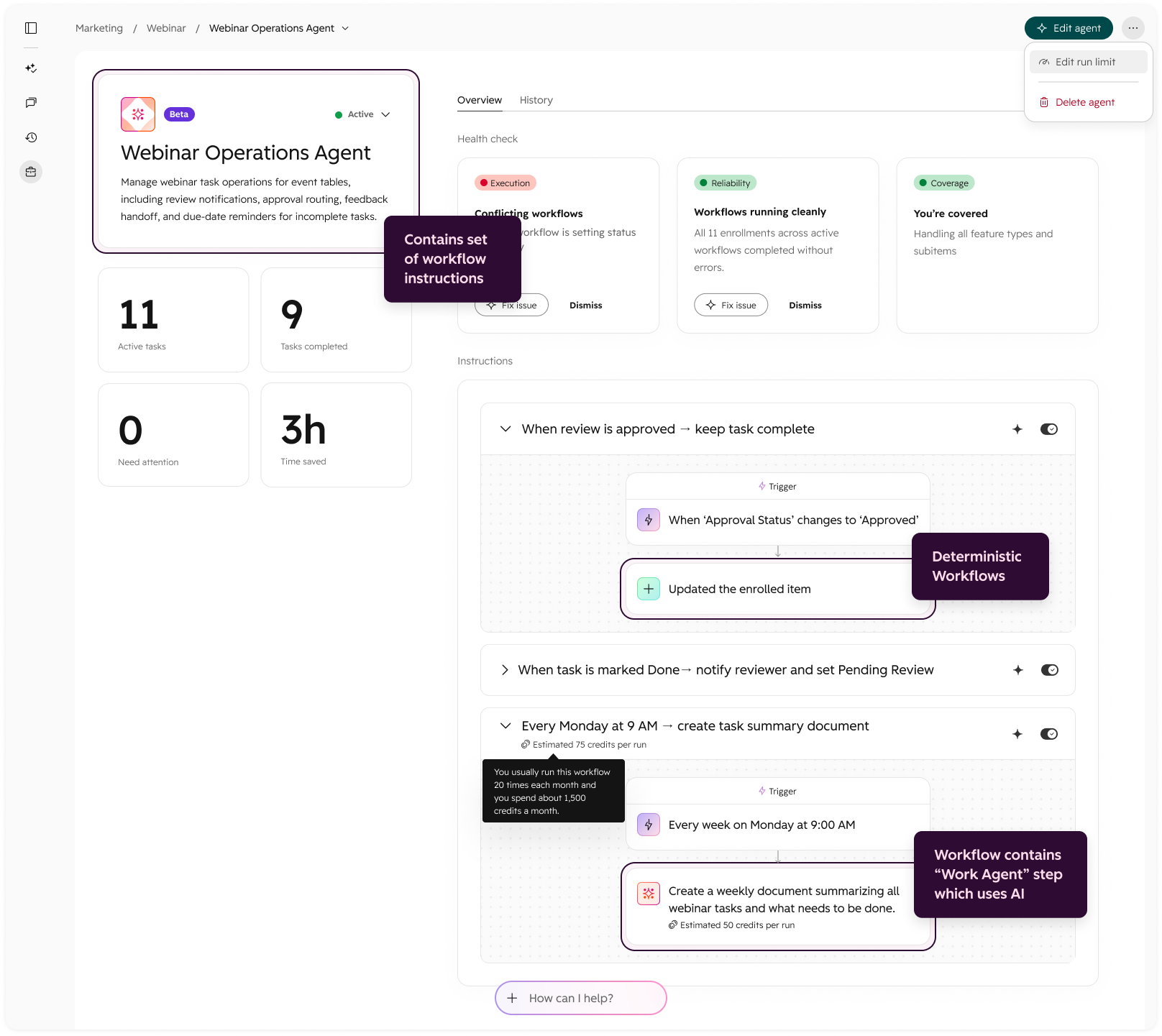
Agents in HubSpot Work allow you to bundle together a set of workflows, which make up the agents instructions. This drives what each agent does within that project. The set of instructions can be more or less intelligent, based on how you design them.
Each workflow is made up of a Trigger + Steps. Not everything has to be AI. Some steps are basic automations like IF this happens THEN notify someone which does not involve AI, or Work agents. However, sometimes you will need more complex, agentic driven steps that do leverage Work agents. These will consume HubSpot credits when executed.


.png?width=193&name=jos%20(1).png)




