What is it?
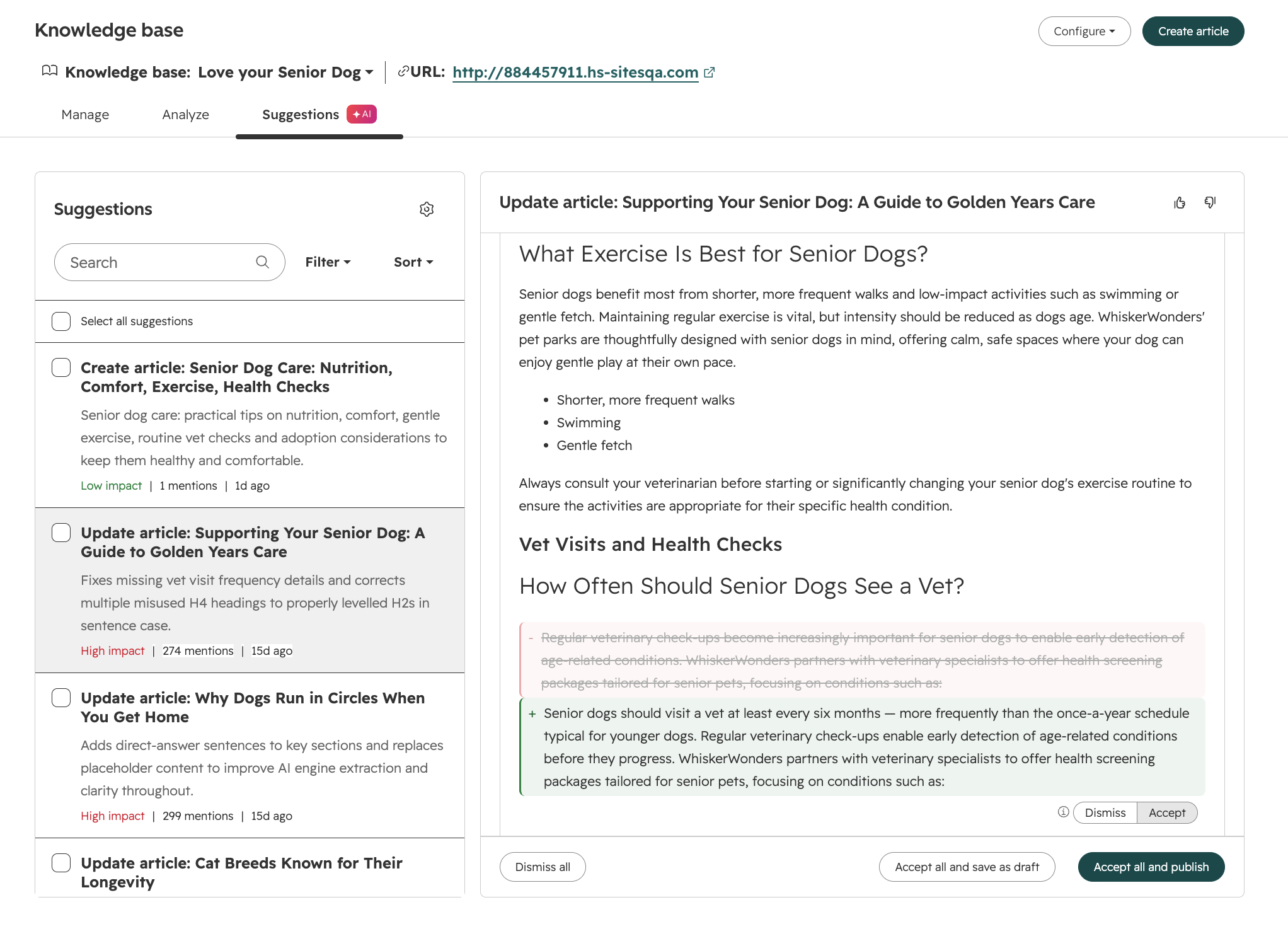
Breeze knowledge base agent analyzes and extracts topics from your tickets, compares them to existing knowledge articles, and surfaces suggestions for new articles and edits to existing articles where content is unclear, outdated, incomplete, or off-brand. You can review, accept, or reject each suggestion directly from the Suggestions tab.
Why does it matter?
Knowledge base content goes stale over time. Without a systematic way to catch issues, teams are left doing manual audits to find outdated facts, unclear phrasing, or content gaps: problems that often only surface when a customer files a support ticket.
Knowledge base agent lets teams address these issues proactively and keep self-service content accurate without dedicating manual review cycles.
How does it work?
The agent scans existing articles, compares them against support ticket patterns and brand guidelines, and generates targeted improvement suggestions.
Setup
Knowledge base agent requirements:
- - Your portal should have at least 5 closed tickets
- - You should have a knowledge base setup
- - Customer conversation data switch should be toggled on
After confirming the requirements:
- - Navigate to Service > Knowledge Base > Suggestions
- - Click the knowledge base agent tab, then "Create knowledge base agent."
- - Select a knowledge base and a ticket pipeline you'd like the agent to pull tickets from
- - Knowledge Base Agent will produce suggestions in the primary language set on the knowledge base utilized
- - Click Finish

Using Suggestion Cards
- Sort / filter by the preferred method (Impact, Card Type, Source Count, Age).
- Click a suggestion card to open the associated article.
- Review the suggested change. Click "Source conversations" beneath applicable suggestions to see which support tickets and knowledge gaps contributed to the article(s).
- Toggle "Accept" or "Dismiss" for each suggestion item, then choose Accept all and publish, Accept all without publishing to create a draft for later review, or Dismiss all.
- View in editor to continue editing or view the live published page.
- Provide feedback on the AI-generated content you see in the editor.
Edit Suggestion Types
You'll see the following edit suggestion types:
Clarity: rewrites unclear phrasing to make articles easier to understand
Incomplete: identifies missing information
Stale data: flags outdated facts/references
Branding: checks that articles match your company's name and messaging standards
Answer Engine Optimization (AEO): improves how your articles appear in AI-generated answers and search features
Voice & formatting: rewrites content to match consistent tone, voice, and formatting
Decay: detects articles whose traffic or engagement has declined significantly
On September 16th, knowledge base agent will begin consuming credits. You pay $2 (200 credits) when you prompt the knowledge base agent to generate one new knowledge base article.
Note: edit suggestions to existing knowledge articles will be included in the Service Hub seat.
Who gets it?
Service Pro, Service Enterprise
Learn more here



.png?width=193&name=jos%20(1).png)




