What’s changed?
Spam submission details now clearly show why a submission was flagged, what was caught, and how to prevent similar spam.
What is it?
We’ve made updates that improve how spam submissions are surfaced and understood across forms. These changes make existing spam information easier to find, interpret, and - most importantly - act on.
Updates include:
- - A new Spam tab on each form that surfaces organized insights like spam severity, top spam types, and upcoming automatic deletions, along with a filtered list of blocked spam submissions and in-context actions to view, (bulk) release, or (bulk) delete.
- - Richer spam submission details, with clear explanations of why a submission was flagged, what content was caught, recent history for that spam type, and inline guidance to update settings and prevent similar spam in future.
- - Easier access to spam protection settings, with Bot Filtering and reCAPTCHA now surfaced directly within each form’s details page.
- - Easier access to spam submissions across all forms from the global Forms Analyze tab.
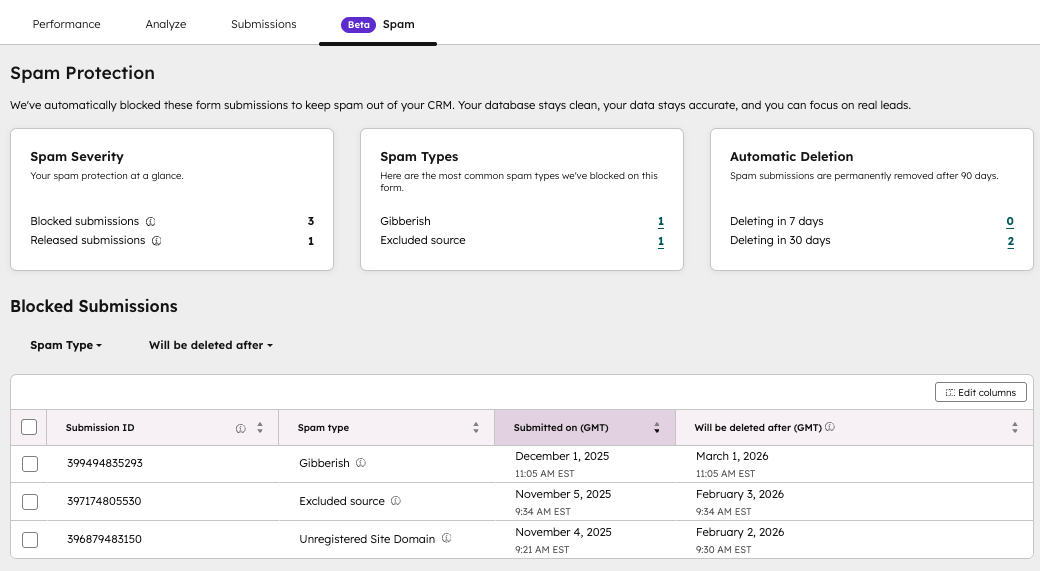
Screenshot: New Spam tab
Why does it matter?
It’s been challenging to understand where spam shows up, how serious it is, and what actually needs your attention. Spam submissions haven't been easy to locate, making it confusing and time-consuming to review and clean up your data. These updates make spam easier to notice, interpret, and manage - reducing the time needed to triage submissions and improving clarity across the entire Forms experience.
How does it work?
Per form spam insights
- - Navigate to Marketing > Forms
- - Create a new form or open an existing form
- - Navigate to the new Spam tab to see insights and spam submissions filtered for that form. Review individual submissions and choose whether to release or delete them. Bulk-released and bulk-deletions are also possible.
For more information, click here.
Spam insights on all forms
- - Navigate to Marketing > Forms > Analyze
- - Open the Spam submissions CTA
- - View spam submissions across every form.
- - Filter the table as needed, and take action on individual submissions - or use bulk release and bulk delete.
Who gets it?
All hubs and tiers





.png?width=193&name=jos%20(1).png)




