What is it?
Android users can now temporarily pause all HubSpot mobile notifications for a set period, using predefined time slots or custom durations.
Why does it matter?
Notifications keep you informed, but they can become distracting during focused work or outside business hours. With notification muting, you can control when you receive alerts, helping you stay productive while ensuring important updates don't get lost in notification overload. You can quickly silence notifications during meetings or personal time, then resume them when you're ready to engage.
How does it work?
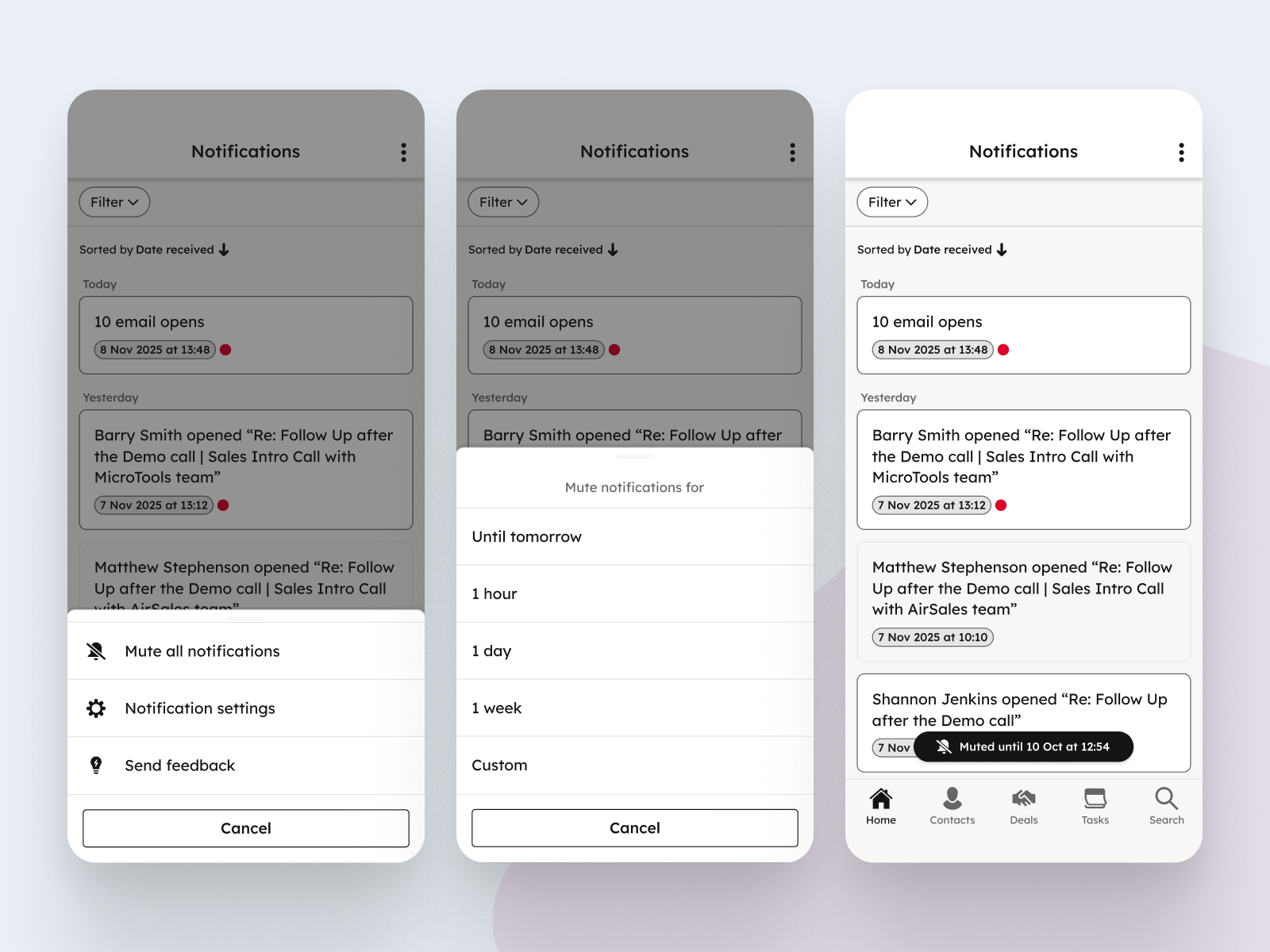
You can mute notifications from two locations in the Android app:
Notification center
- Tap the Bell icon in the top right corner of the homepage
- Tap the three-dot menu > Mute all notifications
- To resume notifications, follow the same steps and tap Resume notifications
Settings
- Navigate to Settings > Notifications
- At the top of the page, select Mute all notifications
- To resume notifications, deselect this option
From either location, you can choose from predefined mute durations:
- Until tomorrow
- For 1 hour
- For 1 day
- For 1 week
- Custom time and date
Who gets it?
This feature is available to All Android users across all HubSpot tiers and hubs. Please ensure you download the latest version of the HubSpot mobile app from the Google Play Store to access these new controls.





.png?width=193&name=jos%20(1).png)




