What is it?
We’re adding support for Payments in Forms, allowing you to integrate digital payments directly into forms built in the new Editor:
- Collect payments at submission: Visitors can complete a form and make a payment in a single streamlined process.
- Access payment & submission data: Both form responses and payment details are stored in HubSpot for easy tracking.
- Flexible payment redirects:
- Simple redirects: Direct all visitors to a single payment link.
- Conditional redirects: Send visitors to different payment links based on the information they provide in the form.
This update simplifies payment collection, improves conversion rates, and ensures a smoother experience for you and visitors.
Why does it matter?
Businesses often need to collect payments alongside form submissions, whether for event registrations, donations, or product purchases.
With this update, you can now seamlessly collect payments through forms in the new editor, making transactions easier while keeping all form submission and payment data in HubSpot.
How does it work?
Adding a payment link to a form
- Navigate to Marketing > Forms
- Create a new form or open an existing form.
- In the upper left, click the Contents icon. In the left panel, click on 'On submit'.
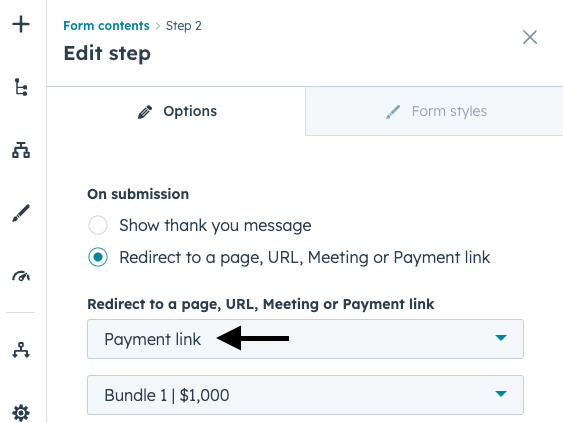
- In the left panel under 'On submission', select 'Redirect to a page, URL, Meeting or Payment link'
- In the dropdown menu, select Payment link. Next, select the respective payment link to add to the form.
- In the top right, click Review and update to publish the changes to your live form.
To learn how to add a payment link with conditional logic (requiring a Marketing Hub or Content Hub Professional or Enterprise subscription) or how to review form permissions and payment status, click here.
Who gets it?
All hubs and tiers, Commerce, Commerce Pro, Commerce Enterprise, Content Pro, Content Enterprise, Marketing Pro, Marketing Enterprise
To understand more about Payment links at HubSpot, click here.





.png?width=193&name=jos%20(1).png)




