What’s changed?
What is it?
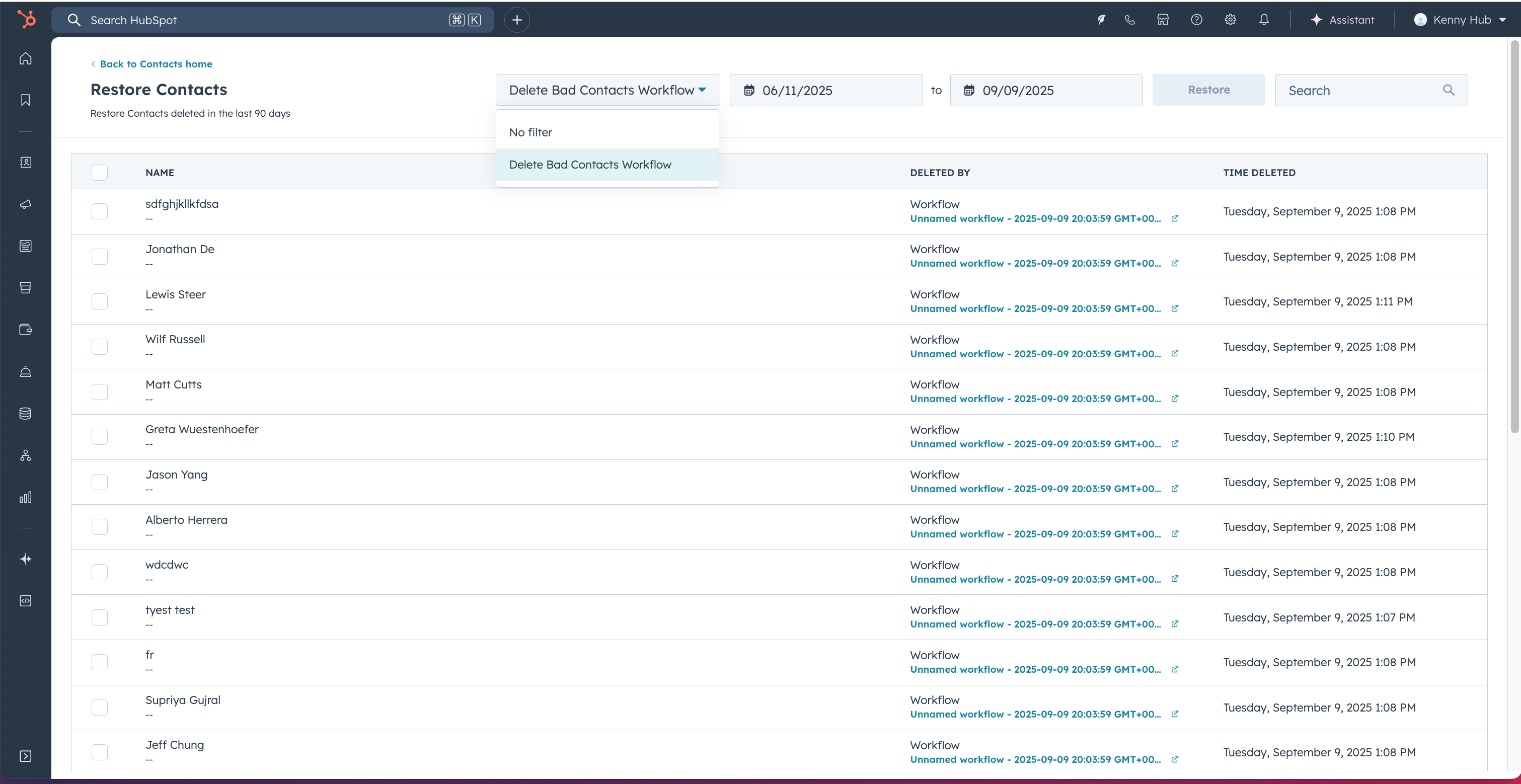
You can now filter contact deletions in the recycle bin by user and workflow source, making it easier to restore only the contacts deleted by a specific source.
Why does it matter?
Workflow and user-triggered bulk deletions can mistakenly remove hundreds of contacts at once. Previously, you could only restore records by date, which often meant restoring unwanted deletions alongside the contacts you needed. This targeted filtering allows you to pinpoint and restore only the contacts affected by a problematic source, saving time and reducing the risk of restoring irrelevant records.
How does it work?
In your recycle bin, you'll now see a new source filter that lets you view deletions by workflow and user name.
To restore deleted contacts:
- Navigate to Contacts > Actions > Restore records
- In the filter dropdown, select the specific workflow or user name
- Review the contacts deleted by that source
- Select and restore only those records
Who gets it?
This feature is available to all HubSpot users across all hubs and subscription tiers.





.png?width=193&name=jos%20(1).png)




