What is it?
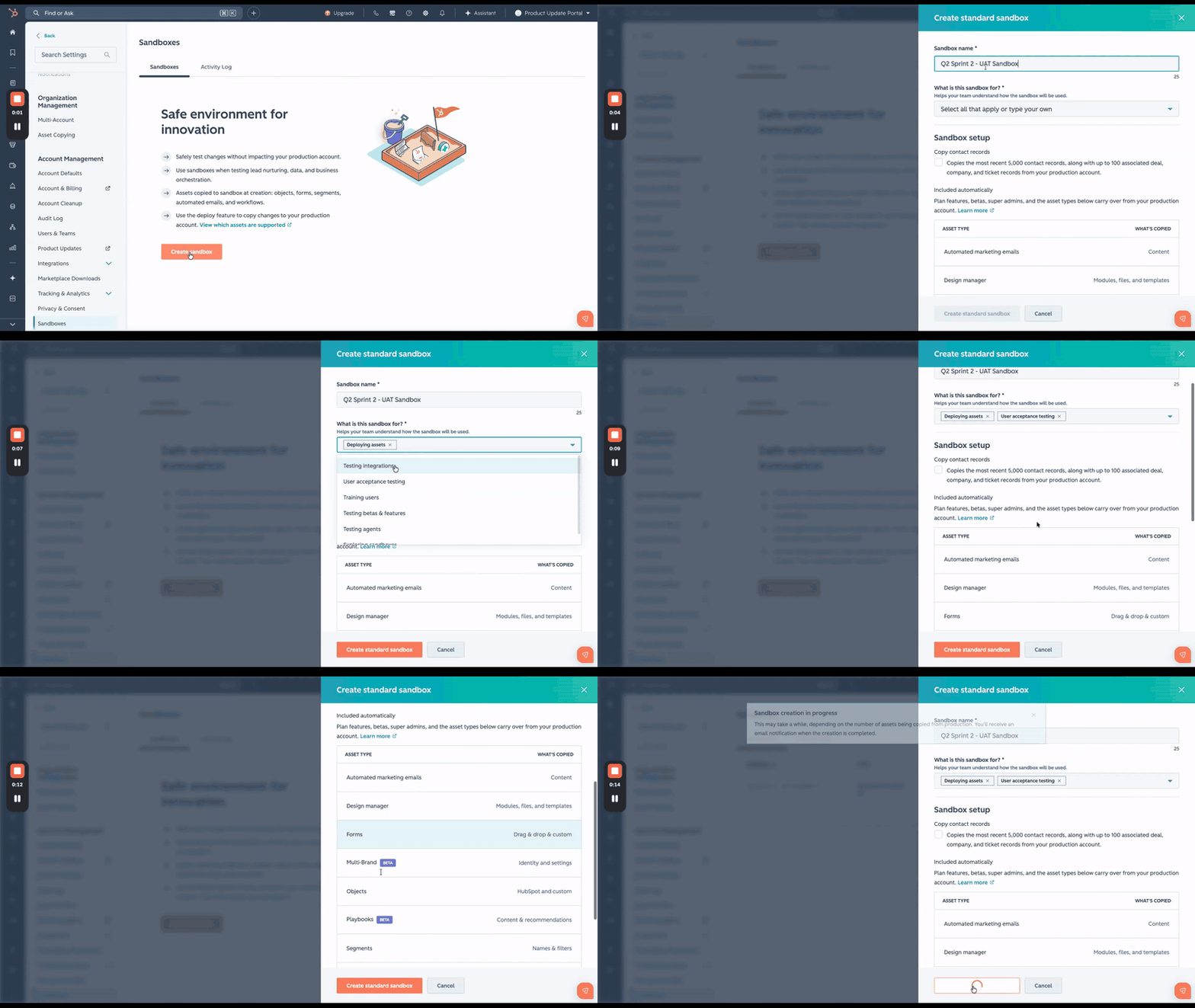
When creating a sandbox, you can now select one or more use cases that describe how the sandbox will be used and give it a name.
Why does it matter?
Without a clear purpose, sandboxes can become shared testing environments where conflicting work leads to unreliable results. By defining a use case upfront, teams can establish clear expectations: who should have access, what kinds of changes are appropriate, and how the sandbox should be managed.
For example:
- A sandbox designated for asset deployment signals that active development may be taking place and that users should avoid making unrelated changes.
- A sandbox created for user training communicates that experimentation and hands-on learning are encouraged.
How does it work?
When creating a sandbox in Settings > Sandboxes:
- Click Create sandbox.
- Under Sandbox name, enter a name for your sandbox.
- Under What is this sandbox for?, select one or more use cases:
- Deploying assets
- Testing integrations
- User acceptance testing
- User training
- Testing betas and new features
- Testing agents
- General sandbox exploration
- If your intended purpose isn't listed, enter a custom use case.
- If you want to copy contact records, select Copy 5,000 contacts and associated records.
- If you choose not to copy records now, you can import them after sandbox creation.
- Click the down icon to review the list of assets that will be copied from your production account to your sandbox.
- Click Create standard sandbox.
- You'll receive an email notification once the sandbox is ready.
Who gets it?
Smart CRM Enterprise, Revenue Hub Enterprise, Marketing Hub Enterprise, Data Hub Enterprise, Content Hub Enterprise, Sales Hub Enterprise, Service Hub Enterprise





.png?width=193&name=jos%20(1).png)




