What is it?
Users sending a quote can now personalize the email with merge tokens, insert saved templates, attach documents and meeting links, and send from a team inbox more easily — using the same composition tools already available in HubSpot’s standard email composer.
Why does it matter?
Sending a quote is one of the most important moments in a sales cycle, but the quote send flow has been missing basic tools users expect across HubSpot: personalization tokens, reusable templates, document and meeting-link inserts, and an easier way to send from a team inbox.
This update closes that gap, bringing the standard HubSpot email composer experience into the quote editor so reps can send polished, personalized quote emails without switching tools.
How does it work?
When a user clicks send on any quote, the share quote modal now includes:
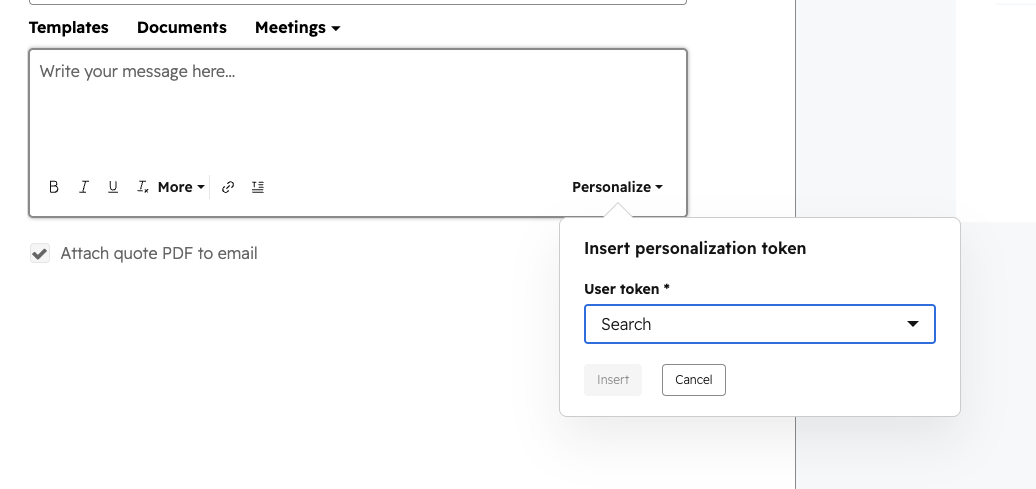
- - Personalization tokens — a token picker in the body editor lets users drop in merge fields for contact, deal, and sender properties. Tokens render real values in both the preview and the sent email.
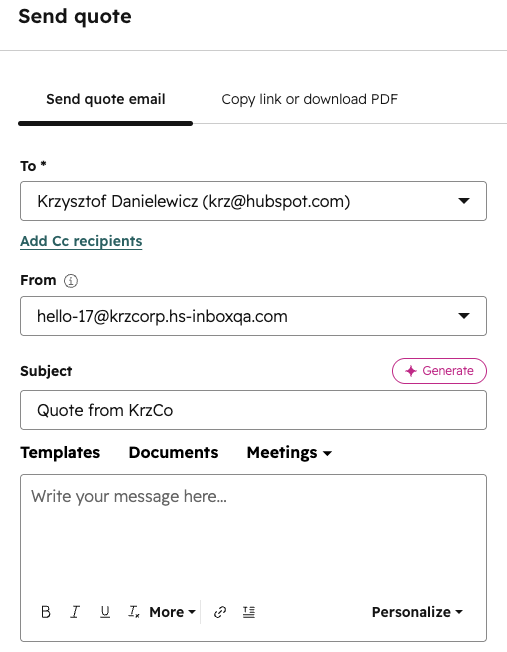
- - Insert toolbar — a new toolbar between Subject and Body with three actions: Templates (pick a saved email template; subject and body auto-fill), Documents (insert a link to a document from Sales Content), and Meetings (insert a scheduling link).
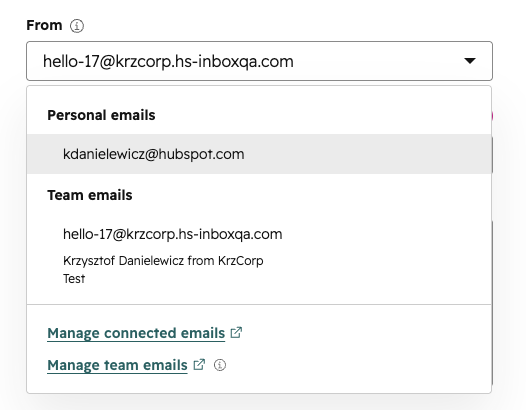
- - Refreshed From dropdown — team emails are easier to find. The email address is shown as the primary label, a tooltip explains when to use a team email vs a personal one, and the dropdown footer links directly to the team email setup page (or "Connect a team email" if none are set up).
Insert toolbar: Templates, Documents, Settings
Personalization Tokens
Team Email Settings
Who gets it?
Commerce Hub Professional, Commerce Hub Enterprise





.png?width=193&name=jos%20(1).png)




