What is it?
Customers see a personalized deployment recommendations for Customer Agent, tailored by the customer's own conversation volume, Agent benchmark resolution & performance data, SLA adherence, and customer historical conversation trends. Customer Agent recommends where they can help with your conversation volume.
Why does it matter?
Why it matters
Customers need guidance on where and how to deploy Customer Agent for maximum benefit. Today, deployment decisions are manual, error-prone, and based on guesswork or external calculations. Bringing benchmark-driven, prescriptive recommendations into the product removes friction and helps customers quickly realize value by deploying CA to the right channels and topics, saving time and resources.
How does it work?
Self-Serve (In-Product) Experience
Customers visit the Customer Agent app after agent creation. The screen displays deployment recommendations based on recent conversation volume, channel usage, response times, and SLA metrics.
How it works
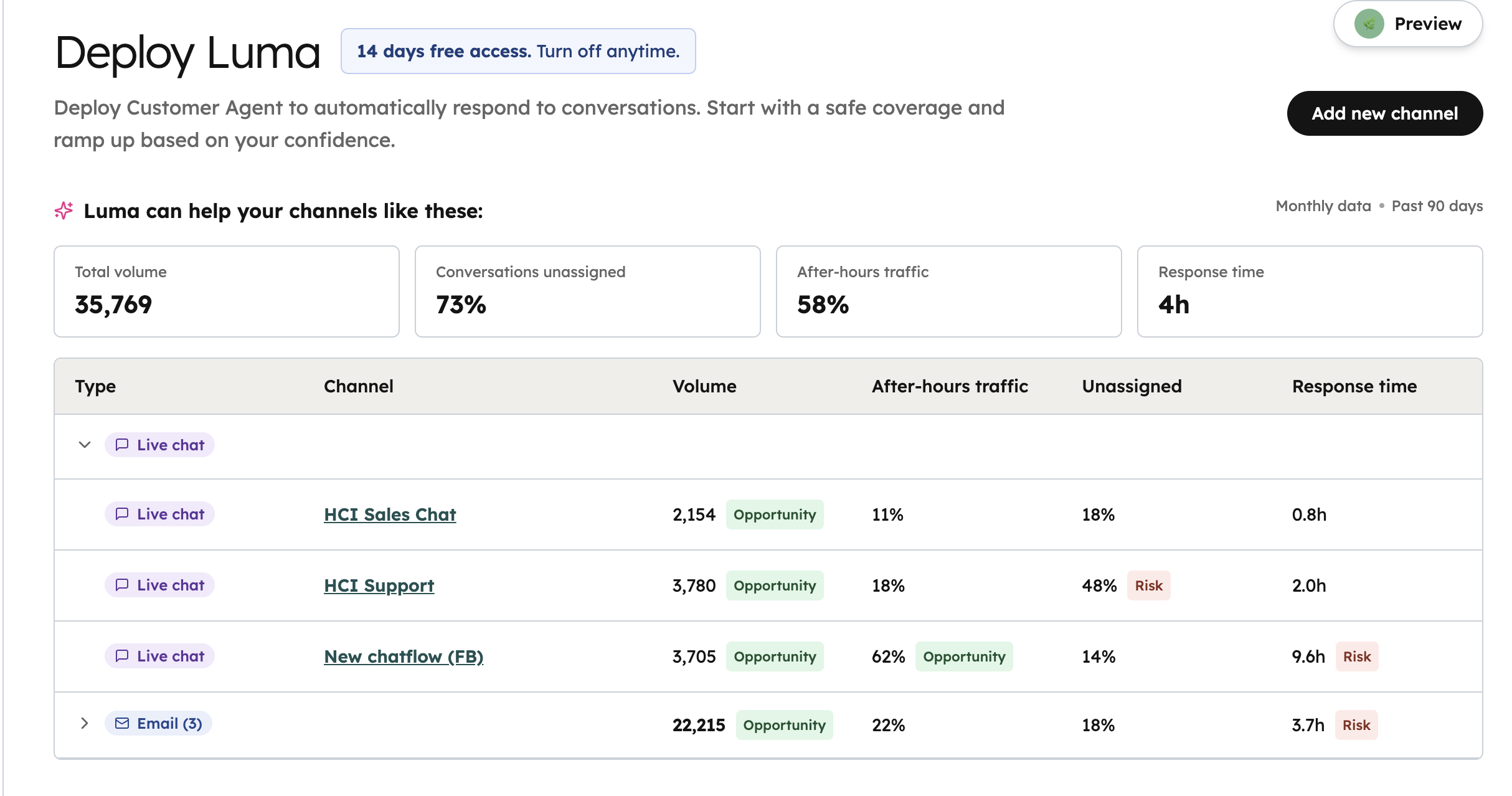
Recommendations appear on the Deploy page, showing active deployments, personalized suggestions, channel settings, and advanced configuration options. Customers can follow the default 'Start Small' recommendation, or adjust settings as needed. Eligibility requires at least 30 conversations per channel in the last month; channels with CA already deployed are excluded.
Customer Agent will analyze your conversations on your existing channels and recommend a deployment strategy based on the following factors:
- Conversation Volume - the average monthly conversation volume of a channel
- After Hours Traffic - the percentage of inbound conversations that occur after business hours
- Unassigned - the percentage of inbound conversations that were not automatically assigned to a human agent
- Response Time - the average time taken for human reps to respond to a conversation
Customer Agent will also flag channel metrics as an Opportunity or Risk
Opportunity - highlights opportunities where Customer Agent can assist with conversations in high volume or after hours
Risk - High percentage of unassigned tickets where Customer Agent could take over or long average response times where Customer Agent can help reduce
Who gets it?
Smart CRM Enterprise, Revenue Hub Professional, Smart CRM Professional, Sales Hub Professional, Marketing Hub Enterprise, Service Hub Professional, Service Hub Enterprise, Content Hub Enterprise, All hubs and tiers, Marketing Hub Professional, Data Hub Professional, Revenue Hub Enterprise, Sales Hub Enterprise, Content Hub Professional, Data Hub Enterprise





.png?width=193&name=jos%20(1).png)




