What is it?
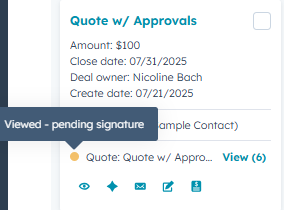
Customers with access to CPQ via Commerce Professional and Enterprise can now view quote associations and create quotes directly from the Board View in the CRM.
This enables you to:
- Instantly see which deals have associated quotes
- Check the current status of each quote
- Quickly create new quotes via the Quick Actions menu
Why does it matter?
Sales reps rely on Board View to track their pipeline and prioritize deals. By surfacing quote activity and associations directly in this view, reps can:
- Get a comprehensive picture of where each deal stands
- Identify which deals need quoting action
- Spend their time more effectively on deals that are progressing
How does it work?
Go to CRM > Deals and select the board view. All associated CPQ Quotes will show up automatically.
- To create a Quote, hover over a deal and select the "Create quote" quick action
- To view Quote activity and other Quote details:
- Hover over the status dot
- Click on "view" to open the sidebar, which will auto-scroll to the Quotes card
- Click on the quote name, which will open the Quote activity feed (note: draft quotes will open the quote editor)
Who gets it?
Commerce Professional and Commerce Enterprise





.png?width=193&name=jos%20(1).png)




